
title: “Fedora Linux 45 Lands: Stratis Installs and GNOME 51”
slug: fedora-45-stratis-gnome51
date: 2026-11-15 21:03:08
category: Linux Distros
tags: [fedora, stratis, gnome, linux-distros, plasma]
Fedora Linux 45 arrived on November 3, 2026, two weeks after I last looked at the distribution and roughly two months after the project moved its target date twice. The headline is not the desktop: it is the installer. Anaconda can now lay Fedora down on Stratis, the Red Hat storage stack that wraps device-mapper, XFS and LUKS into something closer to a ZFS-shaped interface without leaving GPL-only code behind. That is a quietly enormous change for anyone who has been told for a decade that the only serious answer to “I want snapshots and thin provisioning on Linux” is “use ZFS and accept the licence”.
The desktops move forward too: GNOME 51 “A Coruña” on Workstation and KDE Plasma 6.8 on the KDE edition, both riding the Linux 7.2 kernel. And the release turns a number of quiet defaults into loud ones — signed RPMs only, restricted ptrace, a userspace console in place of the in-kernel one, and two long-dead NetworkManager VPN plugins formally retired.
Fedora 45 at a glance
- Release date: November 3, 2026 (delayed from the original October 20 target)
- Kernel: Linux 7.2 series (7.2.15 in the shipped repos)
- Desktops: GNOME 51.1 on Workstation, KDE Plasma 6.8.2 on the KDE edition, plus Cinnamon, Xfce, MATE and COSMIC spins
- Storage: Stratis now installable directly from Anaconda
- Installer: Anaconda WebUI becomes the default for the Atomic Desktop family
- Toolchain: systemd 262.1, RPM 6.1, glibc 2.44, GCC 16.2, LLVM 23, Python 3.15, Go 1.27, Perl 5.44, OpenSSL 4.0
Stratis in Anaconda is the headline feature
This is the part worth reading twice. Stratis is Red Hat’s answer to the question “why do enterprise Linux shops end up on ZFS?” — a storage manager that layers thin provisioning, storage pooling, snapshots and encryption over a normal XFS-on-device-mapper filesystem, entirely in free software.
Until now, getting Stratis meant leaving the installer entirely: you installed Fedora on plain LVM, then destroyed the volume group and rebuilt it with stratispool and stratisfs by hand. Fedora 45 removes that ritual.
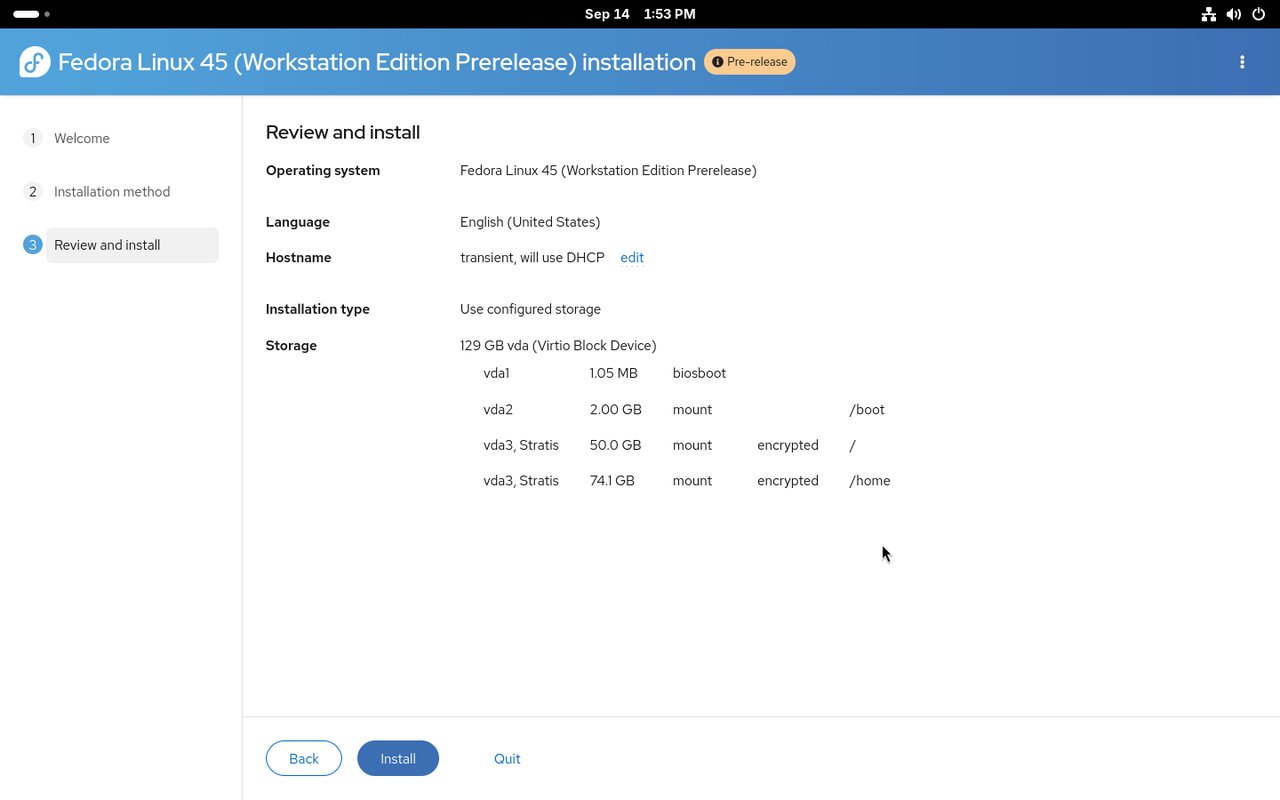
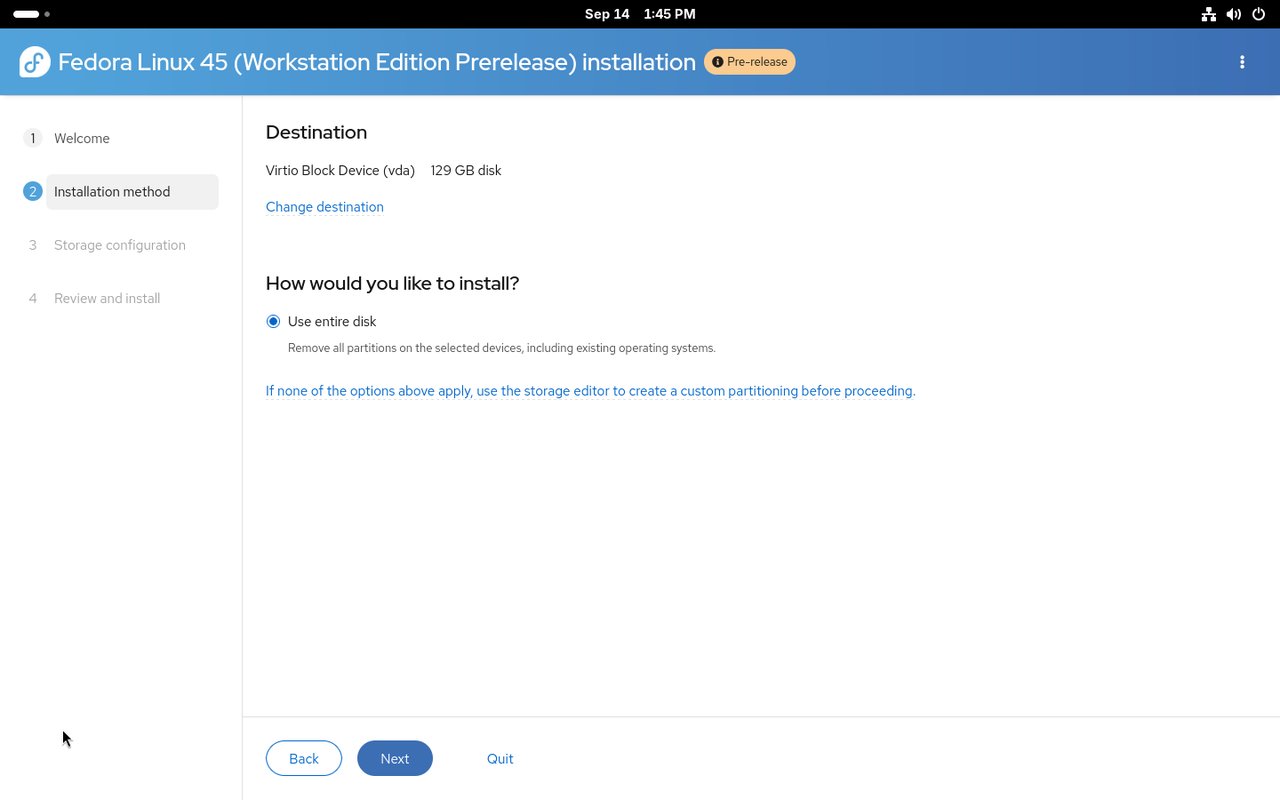
The screenshot above is the real install summary from a Stratis install: two filesystems, vda3, Stratis, both marked encrypted, mounted on / and /home.
There are two ways in:
- Graphical. In the installer’s manual/custom partitioning step you can now launch the Cockpit storage module directly from Anaconda, build a pool across one or more physical drives, and create dynamic
/and/homefilesystems on demand. - Automated. Kickstart gained
--type=stratisforautopart, plus dedicatedstratispoolandstratisfscommands for laying out a pool and its filesystems explicitly.
There are honest limits, and you should know them before you wipe a machine. Anaconda cannot configure caching or passphrase-free encryption during install — you enable both afterwards. Guided partitioning does not offer Stratis at all; you have to go through the manual path and the Cockpit editor. And with over-provisioning turned on, a pool can cheerfully promise more capacity than the disk physically holds, so you need to watch actual usage rather than the advertised number.
The official write-up is worth bookmarking if you plan to try it: Fedora Magazine published a dedicated guide, Installing Fedora 45 on Stratis Storage.
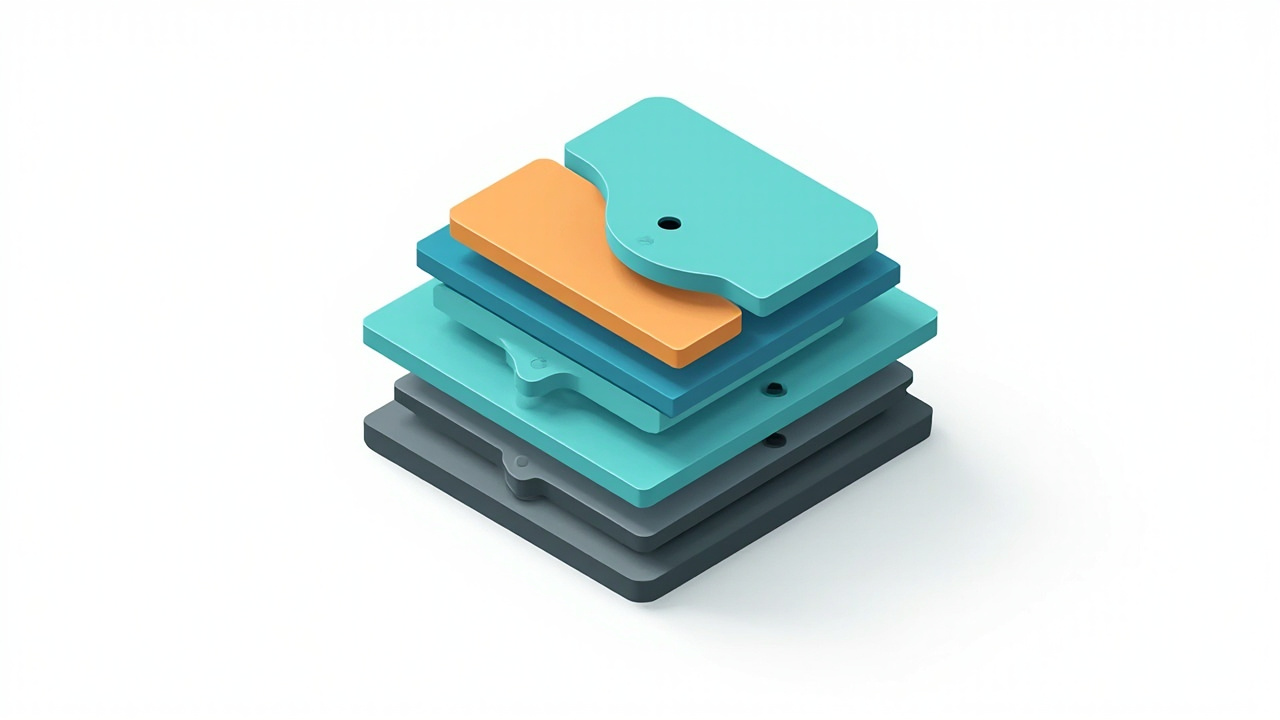
Figure: AI-generated illustration of the Stratis storage stack. Real screenshots were unavailable for the layered view at time of writing.
GNOME 51 “A Coruña” on Workstation
GNOME 51 went final upstream on September 16, and Fedora 45 Workstation ships it at 51.1. The headline changes are mostly the ones you feel rather than the ones you read about:
- Reworked frame scheduling in Mutter, with fewer buffer copies during screencasts. Animations stay smooth under load.
- Scalable SVG cursors across all resolutions, and simplified graphics pipelines targeting modern display drivers.
- Monitor brightness is remembered across reboots, and Night Light now works on hardware without a gamma LUT.
- Settings gains auto-rotate on displays with accelerometers, an option to disable the touchpad when an external mouse is attached, and a dedicated fingerprint enrollment screen. WEP Wi-Fi support is gone.
- The login screen can choose its authentication method, including web login. Remote Login supports socket-activated SSH, and Remote Desktop adds smartcard redirection and Kerberos login.
- Files (Nautilus) shows a live count while dragging multiple items and no longer stalls on slow directory reloads. The file previewer was rewritten on GTK 4 and libadwaita.
- Papers gains built-in document signing with drawn or image-based signatures; Maps downloads offline areas and shows live transit departures.
- GNOME Software warns about applications that are no longer maintained and shows more detail about Flatpak permissions.
The most consequential change is quieter: oo7, a modern Secrets Service implementation written in Rust, replaces GNOME Keyring as the default secret provider on Fedora’s GNOME desktops and migrates existing keyrings automatically. Both daemons remain installed, so if you are debugging a keyring issue, check which one currently owns org.freedesktop.secrets rather than assuming.
Fedora also added encapsule, a new command-line tool that runs isolated development tasks and untrusted third-party scripts inside dedicated containers rather than on your host. On a developer workstation that is quietly a useful default.
KDE Plasma 6.8, and the X11 sunset
The KDE Plasma Desktop edition ships Plasma 6.8.2, landing alongside the KDE project’s 30th anniversary. Highlights:
- Per-screen virtual desktops — workspaces are managed independently on each monitor.
- A built-in Dwell Clicker sends a mouse click when the pointer stops moving, removing the need for a third-party accessibility tool.
- System Monitor can pin a process to chosen CPU cores and shows VRAM load as a percentage.
- kscreenctl, a new CLI tool for scripted display configuration, alongside much improved Wayland screen mirroring, custom display modes and ambient-light auto-brightness.
- Spectacle can record system audio and microphone input concurrently, at arbitrary resolutions for virtual screen sharing.
- Remote desktop performance improved, with bidirectional clipboard sync and an exclusive mode. HDR colour stability and lower input latency came along for the ride.
- A light/dark theme toggle in the system tray, a microphone test, and the new Union theming system.
The big structural note: Plasma 6.8 retires native X11 session support upstream, completing the Wayland transition. X11 applications remain supported through XWayland. One wrinkle worth knowing if you are an early adopter — Fedora 45 still lists plasma-workspace-x11 and kwin-x11, but they are old 6.7.5 builds that never moved to 6.8. dnf will happily resolve them against Plasma 6.8.2, and upstream no longer supports that combination.
The installer changes for Atomic Desktops
The Atomic Desktop family — Silverblue, Kinoite, Sericea, and the rest — now uses the Anaconda WebUI by default instead of the legacy GTK installer. They also gain a tech preview of remote web-based installation: boot with inst.webui.remote and complete the install from a browser on another machine over HTTPS, authenticated with a PIN. Atomic images are now built with image-builder rather than lorax, and preview disk images exist for Silverblue and Kinoite.
Fedora Atomic images also ship filtered Fedora Flatpak runtimes alongside verified Flathub application support. Note that the mirror now uses the Atomic brand names for its directories and ISOs: the old Fedora 44 Onyx/ and Sericea/ trees are now Budgie-Atomic/ and Sway-Atomic/.
Admin-visible changes
kmscon replaces fbcon. Fedora now runs tty1 through tty6 on kmscon, a userspace console implementation with better fonts, Unicode handling, scrolling and mouse support. It changes some habits: tty returns a /dev/pts device, setfont and loadkeys no longer do anything (use localectl set-keymap), and graphical programs need kmscon-launch-gui. If you want to keep an fbcon console as a fallback, mask kmsconvt@tty5 and enable getty@tty5.
Two VPN plugins are gone. NetworkManager-vpnc and NetworkManager-fortisslvpn are retired and obsolete starting with Fedora 45. If you rely on either, move to a supported alternative before you upgrade.
authselect dropped the nis profile. Fedora 44 listed local, nis, sssd and winbind; on Fedora 45 the list stops at three, and authselect select nis fails outright.
PAM integration tightened. The administrative utilities chpasswd and newusers now route through the system PAM stack, so batch password and user management tasks inherit local password complexity, history and audit policies consistently.
Butane in Ignition. Server and Cloud deployments get native Butane configuration support directly within Ignition at first boot, removing the need to pre-transpile YAML before provisioning.
Driver packages now install drop-in configuration snippets managed automatically through RPM file triggers, matching how modern modular configurations already work for crypto-policies and CA certificates.
Security defaults get stricter
Three changes here will bite people who have automated installs:
- RPM signature verification is enforced by default. Unsigned packages are refused at installation time unless you override it with
--nosignature. ptraceis restricted for unprivileged users. An ordinary user can no longer inspect other processes belonging to the same user by default. Installing the debugging tools restores the old behaviour, which keeps developer workflows intact while closing the hole for everyone else.- Mutter dropped the legacy NVIDIA driver interfaces and now uses only the standard graphics interfaces.
Figure: AI-generated illustration representing the hardened defaults in Fedora 45. Real screenshots were unavailable at time of writing.
Component versions at a glance
| Component | Fedora 44 (updated) | Fedora 45 |
|---|---|---|
| Linux kernel | 7.2.15 | 7.2.15 |
| GNOME Shell | 50.6 | 51.1 |
| KDE Plasma | 6.8.2 | 6.8.2 |
| systemd | 259.10 | 262.1 |
| RPM | 6.0.2 | 6.1.0 |
| glibc | 2.43 | 2.44 |
| GCC | 16.2.1 | 16.2.1 |
| LLVM | 22.1.8 | 23.1.4 |
| Python | 3.14.8 | 3.15.0 |
| Go | 1.26.10 | 1.27.3 |
| Perl | 5.42.3 | 5.44.0 |
| OpenSSL | 3.5.9 | 4.0.3 |
Read that table carefully before you upgrade for its own sake. A fully updated Fedora 44 already carries the 7.2.15 kernel and Plasma 6.8.2 — both arrived there through regular updates. Neither the kernel nor Plasma is on its own a reason to reinstall. What Fedora 45 genuinely adds over an up-to-date Fedora 44 is Stratis installation, the Atomic WebUI and remote install, the stricter security defaults, kmscon, and the full GNOME 51 feature set.
Should you upgrade?
Do it if you want Stratis storage without hand-rolling pools, you run a KDE Plasma workstation and want the X11 cleanup done properly, you want GNOME 51, or you are an Atomic Desktop user who has been waiting for a browser-based installer.
Wait if you depend on NetworkManager-vpnc or NetworkManager-fortisslvpn, you need authselect‘s nis profile, you are on Fedora 44 with current updates and nothing in the list above moves you, or you are an early adopter of Stratis installs — the feature is brand new, so trial it on a spare machine first.
One more practical note: Fedora 45 will be short-lived. Fedora 46 lands in the normal cycle shortly after, so Fedora 45 receives roughly a month of updates before it is superseded. If you are installing today for a long-lived machine, you may be better served by the current LTS-adjacent releases. Fedora Asahi Remix 45 for Apple Silicon ships alongside the main release.
Getting the ISOs
Installation media comes from https://getfedora.org/ — that is the canonical download entry point, and the mirror network it points at serves the files.
- Workstation ISO:
Fedora-Workstation-Live-45-1.4.x86_64.iso(about 2.9 GB) and anaarch64variant - A raw disk image for
aarch64is also published, for Asahi-style installs - KDE Plasma Desktop, Server, Cloud, CoreOS and IoT images live under the same
/45/tree
The official release notes are at docs.fedoraproject.org/en-US/release-notes/f45/, and known issues are tracked on the Fedora Discussion board under the f45 tag on Ask Fedora. Upgrading in place from Fedora 44 is supported through Fedora’s offline upgrade documentation.
The verdict
Fedora 45 is a better release than its two postponements suggested. The Stratis integration is a genuine strategic move — it makes a ZFS-class storage experience reachable from the default installer, which is how these things actually get adopted — and the oo7 switch plus the hardened RPM and ptrace defaults show the security team pushing in the right direction.
The one thing to watch is the KDE X11 transition. Plasma 6.8 upstream has retired native X11 sessions, but Fedora still ships stale 6.7.5 X11 packages that dnf will cheerfully resolve against Plasma 6.8.2. If you still need an X11 session, that is a conversation to have before you upgrade, not after.
Otherwise: this is a solid release, and Stratis support alone justifies a look from anyone who has been waiting for a modern storage stack that does not require a non-GPL licence.
Official details and downloads: https://getfedora.org/
Comments
Stratis in Anaconda finally closing the ZFS licence argument is the real headline here – thin provisioning, snapshots and pooling over XFS without leaving GPL-only code is the thing a lot of homelab folks have wanted since btrfs kept promising. Also good that Fedora flipped the quiet defaults to loud: signed-RPMs-only and restricted ptrace are the kind of hardening that tends to ship unannounced. Two slipped target dates is honestly a calm release cycle by recent standards.