
If you spent the late 90s clicking “Use walk” on LucasArts adventurers, ScummVM 2026.4.0 “Never-slop” might be the most useful thing to happen to your retro collection all year. Released on October 11, 2026 — exactly a few days past the project’s 25th anniversary — this version adds native Linux playback for 194 newly supported games and 12 fresh engines, all in a single quarterly drop. For tux.fan readers running Steam Decks, Nobara, Bazzite, or just plain Ubuntu, that means more classic adventure games now boot, save, and quit without reaching for DOSBox at all.
What ScummVM actually does (and isn’t)
ScummVM is not an emulator. This trips people up constantly, so it’s worth restating: when the project describes itself as “a complete rewrite of these games’ executables,” that’s literal. The original LucasArts Monkey Island shipped as a DOS EXE that called into the SCUMM virtual machine; ScummVM replaces that EXE entirely, runs the game logic against your CPU and GPU directly, and uses the data files you supply. The end result usually feels more responsive than the original 1990s release did on a 486 — you’re running modern compiled C++ in place of interpreted bytecode that the original authors never expected to leave an i386.
That distinction matters on Linux because it means:
- No DOSBox cycles to tune. Badly-tuned
cycles=automade games like Harvester and Rex Nebular unplayably slow on modern displays. With ScummVM you just boot them. - No need to wrap a Windows executable. Multi-CD point-and-clicks with their original copy-protection schemes work in a single binary.
- Saves and cloud sync become portable. The save format is documented, so moving to a new distro keeps your progress.
What’s in the 2026.4.0 release
The headline number is 194 newly supported games and 12 new engines, but the interesting bit is which games:
- Six Nancy Drew titles from Her Interactive’s late-90s era — Secret of Shadow Ranch, Curse of Blackmoor Manor, Secret of the Old Clock, Last Train to Blue Moon Canyon, Danger by Design, The Creature of Kapu Cave. These originally shipped on a proprietary engine that doesn’t always behave on Windows 11; running them through ScummVM is a real usability upgrade.
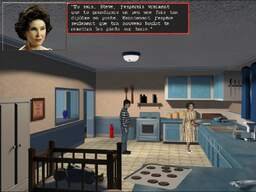
- Both Star Wars: Rebel Assault games, including reworked flight-stick controls. The team specifically called out improved steering for the original 1993 Rebel Assault, addressing one of the biggest criticisms of the original release.
- The MicroProse Adventure Development System (MADS) library: Dragonsphere, Return of the Phantom, Once Upon a Forest, and Rex Nebular. MADS was MicroProse’s proprietary adventure engine in the early 90s before they sold it to Sanctuary Woods; until now only Rex Nebular was playable, so the other three becoming available is genuinely new territory.
- Wintermute engine back-catalogue — 140+ titles through a single engine rewrite, mostly Eastern European adventure games from the 2000s.
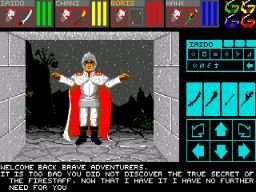
- Dungeon Master (1987) moved from “testing” to “ready” — the genre-defining first-person dungeon crawler from FTL Games. Six English variants (Amiga and DOS) now boot.
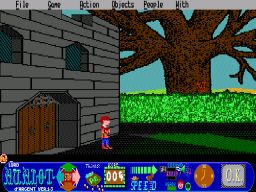
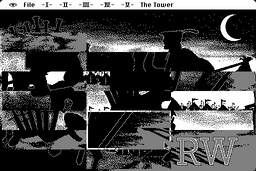
- Some surprises: The Fool’s Errand (1987 Macintosh puzzle classic), Alpha Polaris (2011 horror), Lord Avalot d’Argent, Eagle Eye Mysteries, plus a stack of Spanish-language Mortadelo y Filemón titles that are good adventure games in their own right.
Engine-level bug fixes are listed across 17 engines. The most user-visible ones I noticed: Sanitarium walking sounds fixed, Lure of the Temptress finally shakes a long-standing pathfinding bug, Kyra engine gets an automap in Eye of the Beholder games, and Hopkins‘s shooter mini-game is completed (it’s a Wolfenstein-3D-like sequence hidden inside an otherwise point-and-click game).
How to install ScummVM 2026.4.0 on Linux
There are four reasonable ways to get the new release. Pick whichever matches your distro.
Option 1: Flatpak (works on every distro)
flatpak install flathub org.scummvm.ScummVM
flatpak run org.scummvm.ScummVM
The Flatpak is the simplest path for Steam Deck / Bazzite / Nobara users because it ships a stable, sandboxed copy that Just Works. Updates to 2026.4.0 will roll out through Flathub over the next few days; check with flatpak update.
Option 2: Your distro’s package (if you don’t mind an older version)
Most rolling-release distros already had a ScummVM build, but it almost certainly lags 2026.4.0 by 1–2 months at this point. Ubuntu 26.04 LTS / Debian / Fedora / Arch all ship scummvm in their normal repos. If you’re on a stable distro and can wait for the maintainer to package 2026.4.0, that’s by far the cleanest install:
# Debian / Ubuntu
sudo apt install scummvm

# Fedora
sudo dnf install scummvm

# Arch / Manjaro
sudo pacman -S scummvm
Option 3: AppImage (no install required)
Head to the ScummVM downloads page and grab the AppImage. chmod +x it, double-click, done. Useful for testing the new release without committing to a system-wide install.
Option 4: Build from source (when you want latest today)
git clone https://github.com/scummvm/scummvm.git
cd scummvm
git checkout v2026.4.0
./configure
make -j$(nproc)
sudo make install
The configure script will tell you what dependencies it needs (SDL2, nasm for the x86 JIT, and a few others). On most distros a sudo apt build-dep scummvm before the build saves an afternoon.
Adding your games
ScummVM doesn’t bundle any commercial data files — you must supply them. The team is unusually strict about this: there’s a no-piracy policy and they explicitly call out that “abandonware” is not a legal category. Where to legitimately get your game files:
- Your own original CDs or floppy disks. Drop them in a folder, point ScummVM at the directory, and you’ll usually be playing within seconds.
- GOG.com. Many of the supported titles are available DRM-free, often for under $10.
- Humble Bundle, itch.io, or the developer’s own store for the indie titles in the supported list.
- Freeware / shareware games that the original publishers have explicitly released, which the ScummVM wiki maintains a list of.
Once you have the files:
# Organize by game directory
mkdir -p ~/Games/scummvm/monkey-island
cp /path/to/MONKEY.* ~/Games/scummvm/monkey-island/
Open ScummVM, click Add Game…, navigate to that directory, and the launcher will autodetect the engine. If autodetection fails on a quirky release, you can set the GameID manually under Edit Game → Advanced.
Tips for getting the most out of it
- Enable both subtitles and speech under Audio if the game supports it. LucasArts titles both show and speak; Sierra AGI/SCI games typically show text but rely on the original audio.
- Use the integrated save system (the original save/load screens are still an option, and some purists prefer them, but ScummVM saves are portable across machines).
- Cloud-sync your saves by pointing ScummVM at a synced folder (Dropbox, Syncthing, Nextcloud). Tools like Cloud service in ScummVM docs go further and integrate directly.
- For Steam Deck users: ScummVM ships flatpak builds that work in Gaming Mode. Add a non-Steam shortcut in Steam, point it at the Flatpak command, and launch from the Steam UI.
- Test the engine ports before filing bugs: if a game doesn’t launch, first check the compatibility page — it lists known-working versions and known-broken engine combos.
When to expect Linux builds and what’s next
At the time of writing, the Windows, macOS (including a PowerPC variant!), Dreamcast, Haiku, and OpenDingux builds were up. Linux builds typically follow in the wave of port releases that arrive two to four weeks after the main announcement. If the AppImage or your distro’s package isn’t on 2026.4.0 yet, Flatpak is your fastest path.
Looking forward: the project has settled into a quarterly release cadence under its calendar-versioning scheme (it switched from 2.x semver to 2026.x in January 2026), so the next major drop should land around January 2027. The October 8 dungeon-crawler addition of Dungeon Master to “ready” status suggests the next release will likely add the rest of the FTL Games catalogue (Chaos Strikes Back, Eye of the Beholder).
For 25 years, ScummVM has been the most useful single piece of open-source preservation software on the planet. The 2026.4.0 release — a few days late for an exact 25th anniversary but still the biggest quarterly drop on record — is a great excuse to dig the original CDs out of the attic and put them to work on a Linux box that’s faster than the developers ever imagined.
Official site: https://www.scummvm.org/
Downloads & release notes: https://www.scummvm.org/downloads/
Comments