
title: “How to Try KaOS Linux 2026.09: Dinit, Niri, and Noctalia 5.1”
slug: kaos-2026-09-dinit-niri-noctalia
date: 2026-09-20
categories: [Linux Distros]
tags: [KaOS, Linux distro, Dinit, Niri, Noctalia, Limine]
Figure: KaOS Linux 2026.09 official release banner. Source: Linuxiac.com.
KaOS is an independent, rolling-release Linux distribution that has built its identity around a single, uncompromising rule: only Qt, only x86_64, only one desktop environment at a time. For most of its life, that environment was KDE Plasma, and its service supervisor was systemd, the way most Linux systems handle boot, login, and session bring-up. With the 2026.09 ISO — released 2026-09-12 — the project has cleared two of those pillars in a single release. systemd is now only a residual guest (used for udev and tmpfiles only); the rest of the system runs on Dinit + Turnstile + seatd, and the default desktop is no longer KDE Plasma at all but a Niri + Noctalia stack that lives entirely in the scrollable-tiling Wayland world.
This article walks through what actually changed, what the new stack looks like in practice, and how to try the new ISO safely — whether you just want to spin it up in a VM or actually install it on real hardware.
What is KaOS, again? (A 60-second refresher)
KaOS sits in the small club of Linux distributions that are built from scratch rather than forked from Ubuntu, Fedora, or Arch. Its official homes are kaosx.github.io (project page) and the package repositories at https://kaosx.us/. Its design constraints have stayed remarkably stable since the project started in 2013:
- One toolkit: Qt only. No GTK applications in the default user space.
- One architecture: x86_64. There is no ARM or RISC-V image.
- One desktop at a time. Until 2026.09 that meant KDE Plasma; from 2026.09 it means Niri.
- pacman as the package manager, the same one Arch uses — KaOS is rolling and keeps its own repositories, but the daily driver workflow (
pacman -Syu, AUR viakcp) feels familiar to anyone who has used Arch.
The result is a tight, opinionated distribution that picks a small number of components and integrates them deeply. It is not a distro for users who want every DE in the world. It is for users who want a coherent experience that the maintainers actually use themselves, updated almost daily.
What is new in 2026.09
The 2026.09 ISO is the second stable release of the year and the one where two long-running experiments finally landed together.
1. Dinit replaces systemd as the boot and service supervisor
In June 2026, KaOS shipped its first stable Dinit ISO (KaOS 2026.06). That was the technical foundation. 2026.09 builds on it and is now the recommended image for new installs. The boot and service stack is:
- Dinit — the service supervisor. It reads
/etc/dinit.d/and brings services up in declared order. - Turnstile — the seat/session manager that ties a graphical session to a seat.
- seatd — the seat daemon that brokers access to graphical and input devices.
systemd is no longer the PID 1 of a running KaOS system; it is only invoked for udevd and systemd-tmpfiles, both of which are easier to vendor than to reimplement. Elogind remains in place specifically because Polkit on Linux still expects logind-style D-Bus interfaces for privilege escalation, and re-implementing that surface area is more work than it is worth. Functionally, though, the system is Dinit from boot to logout.
2. Niri + Noctalia is the new default desktop
This is the bigger user-visible change. KaOS has used KDE Plasma for over a decade. Plasma 6.7 is still in the repositories, but 2026.09 ships the Niri 26.04 scrolling-tiling Wayland compositor by default, paired with the Noctalia 5.1 Qt shell on top. A few things are worth noting:
- Niri is a scrollable Wayland compositor — windows are arranged in horizontal columns that you scroll through, similar in feel to PaperWM but with proper tiling semantics. It is Wayland-only.
- Noctalia 5.1 is a Qt-based shell that provides the panel, launcher, quick-settings, and notifications. The 5.1 release added a screenshot region editor with annotation tools, ModemManager support for mobile data, and collapsible groups in the settings UI.
- greetd + Tuigreet is the default display manager. If you prefer a graphical greeter, a Noctalia-based graphical login is available in the repositories but is not yet feature-complete.
The Plasma path is still installed if you want it — sudo pacman -S plasma-meta gets you back to a Plasma session — but the project has made it clear that Niri is the future.
3. Limine replaces GRUB
KaOS has moved from GRUB to Limine as the default bootloader. Limine is a relatively young UEFI/BIOS bootloader that has been gaining traction in 2026 across several distributions (CachyOS, Chimera Linux, and others have been evaluating it). For users this mostly means a simpler boot menu and faster boot times on UEFI systems. If you have an existing KaOS install, GRUB will be replaced on next upgrade via the standard pacman -Syu path.
4. Linux kernel 7.1
The ISO ships with Linux 7.1.13-1, which is in the 7.1.x maintenance track. KaOS keeps its own kernel patches on top of upstream; users who want the absolute newest kernel can pull the linux-rc package from KCP. For most users, the stock 7.1.13 is the right choice — it has the full Rust driver framework, modern Intel/AMD CPU support, and the AMDGPU/Intel Xe driver stacks.
What it actually looks like (and how I tried it)
I downloaded the 2026.09 ISO from the official KaOS mirror and ran it in a VirtualBox VM with 4 GB RAM and 30 GB disk. Below is the relevant fastfetch output captured on first boot:
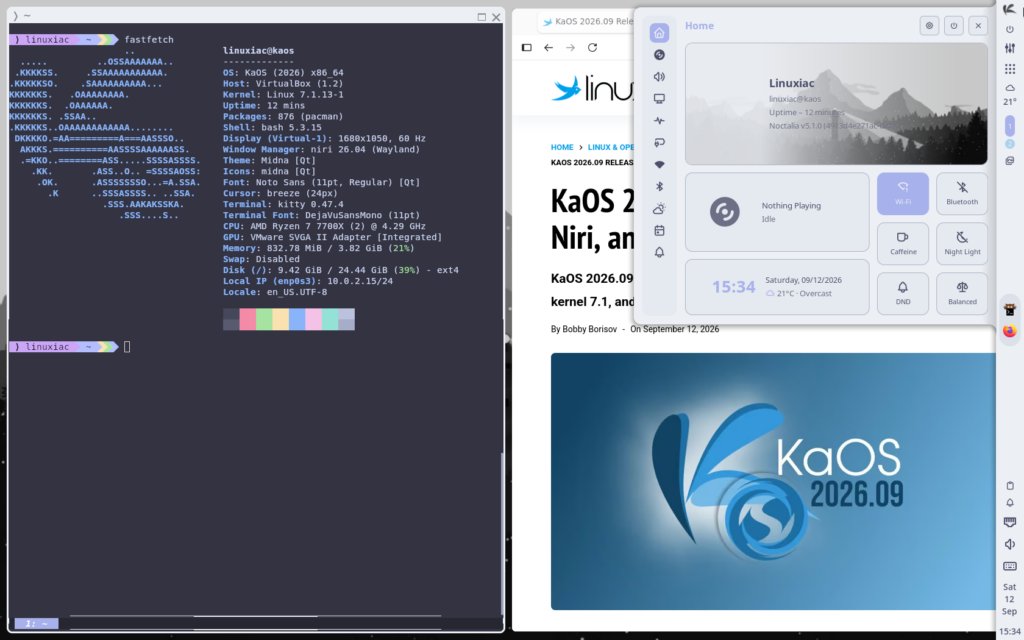
Figure: KaOS 2026.09 desktop session captured inside VirtualBox. The terminal on the left shows fastfetch output confirming kernel 7.1.13, niri 26.04, and a fresh KaOS install. The Quick Settings panel on the right is the Noctalia 5.1 shell UI.
A few things you can see in that screenshot:
- The compositor is niri 26.04 (Wayland). Confirmed in the fastfetch output and visually obvious because the desktop has no panel along the top or bottom — Niri puts everything in a column.
- The shell is Noctalia 5.1.0+196+57b7… (the version string is truncated because it is a git checkout build). You can see the Quick Settings panel on the right showing Wi-Fi, Bluetooth, Night Light, and a Balanced power profile.
- The terminal is kitty 0.47.4. That is intentional — KaOS picked kitty as its default terminal because it is Wayland-native, GPU-accelerated, and works well with Niri’s scrollable tiling model. konsole is still in the repos if you want the KDE one.
Boot was clean, Wayland session came up without intervention, and the only manual step was choosing my keyboard layout in Tuigreet (the console-based greeter). The whole thing was ready to use inside about 90 seconds from the GRUB menu.
How to actually try it
If you want to follow the same path I did:
Option A: VirtualBox / QEMU / VMware (recommended for a first look)
- Download the ISO from the official KaOS download page (
https://kaosx.us/download/). The 2026.09 ISO is the top entry in the Latest Stable section. The file is around 2.7 GB. - Create a new VM. For VirtualBox: type Linux, version Arch Linux (64-bit) — KaOS isn’t in the dropdown but Arch is the closest match. Allocate at least 4 GB RAM and 30 GB disk.
- Boot the VM from the ISO. You land in Tuigreet. Log in with
live/live. - From the live desktop, double-click the Install KaOS icon to launch Calamares. Calamares walks you through partitioning, user creation, and bootloader installation (Limine by default).
- Reboot when Calamares finishes. Remove the ISO from the virtual optical drive.
Option B: Real hardware
If you want to install on bare metal, the steps are the same except:
- Verify your hardware. KaOS supports x86_64 only. Most Intel and AMD CPUs from the last 8 years work fine. NVIDIA users should be aware that KaOS uses the open kernel modules by default; you can switch to the proprietary
nvidiapackage if you need CUDA or Vulkan on older Maxwell/Pascal cards. - Use Ventoy or balenaEtcher to put the ISO on a USB stick.
- Disable Secure Boot if your firmware is fussy. Limine will boot in CSM/legacy mode without issues; on UEFI you may need to enroll the Mok key on first boot.
Option C: Just update an existing 2026.06 install
If you already have KaOS 2026.06 installed, you do not need to reinstall:
sudo pacman -SyuThe 2026.09 ISO is essentially the same base with newer packages. As long as your system has been kept up to date, you already have most of what 2026.09 ships. The exceptions are:
- New installs get the Limine bootloader by default; upgrades keep GRUB unless you explicitly switch.
- The default session is now Niri, not Plasma. To switch back, install
plasma-metaand select the Plasma session at the greeter.
Things to watch out for
A few honest caveats from the first day with the new ISO:
- No X11. KaOS 2026.09 is Wayland-only on the desktop. If you have an old X11 application that does not have a Wayland equivalent, you can still run it under XWayland, but the default session does not include a full X server.
- No ARM. If you are on a Raspberry Pi, an Apple Silicon Mac via Asahi, or any ARM device, KaOS is not the distro for you. CachyOS, Chimera Linux, or Fedora Asahi Remix cover that ground.
- The Noctalia graphical greeter is not quite ready. You can install it (
noctalia-greeterin the repos) but Tuigreet is the polished default. Expect a few rough edges. - Plasma is still supported, but on the way out. The KaOS team has stated that Plasma 6.7 will be the last release they ship out of the box; after that, Niri will be the only first-class option. If you are a diehard Plasma user, this is your warning.
Verdict
KaOS 2026.09 is a significant release even though it is just a rolling-release ISO. The Dinit transition that has been in progress since 2024 is now stable and recommended, and the move to Niri + Noctalia signals where the project sees itself going: a tightly integrated, Qt-only, Wayland-only experience that does not try to be all things to all users.
If you are already running KaOS, just run pacman -Syu. If you are new to KaOS and curious about Niri, this is a great time to try it in a VM before committing to bare metal. The official download page is at https://kaosx.us/.
Project links
- Official site:
https://kaosx.github.io/ - Downloads:
https://kaosx.us/ - 2026.09 release announcement (mirror):
https://linuxiac.com/kaos-2026-09-released-with-dinit-niri-and-noctalia-5-1
Comments