
title: “How to Try AerynOS 2026.08: An Atomic Linux”
slug: aerynos-2026-08-moss-atomic-updates
date: 2026-08-12
categories: [Linux Distros]
tags: [AerynOS, Linux Distro, Atomic Updates, moss package manager, rolling release]
How to Try AerynOS 2026.08: An Atomic Linux With Its Own Rust Package Manager
AerynOS 2026.08 landed on August 2, 2026, and it is the first release of this small, independent Linux distribution that genuinely feels ready to put on a spare drive and poke at. The project’s pitch has always been audacious: a rolling-release, performance-oriented desktop built from scratch with a bespoke Rust toolchain — its own package format (.stone), its own package manager (moss), its own atomic-update engine, and even its own boot loader manager (blsforme). Until now most of that tooling lived behind closed doors. 2026.08 is the release where the project has decided to step into a more open, collaborative phase and ask the community to come kick the tyres.
If you have been bouncing between immutable-but-sterile Fedora Silverblue and rolling-but-fragile Arch, AerynOS is the third option on the spectrum: a rolling immutable model. Updates happen transactionally, the live /usr is swapped via a renameat2() call rather than patched in place, and every transaction creates a brand-new root filesystem tree that you can roll back to in seconds. None of this is theory — the screenshot you are about to see is real output from moss sync -u on a freshly-installed system. Let’s walk through what 2026.08 actually ships, what the install experience feels like, and where the rough edges still live.
What is new in 2026.08
The headline features in this release are:
- OpenZFS data drive support. Until now, AerynOS supported Btrfs and bcachefs as user-managed data drives. Reilly’s OpenZFS work in this cycle adds ZFS to that list. If you have a ZFS mirror sitting in your NAS that you wanted to mount on a Linux desktop, AerynOS will now let you.
- More open, collaborative development. Per the release notes, AerynOS spent the last year deliberately “kept under a very tight leash” while the core tooling hardened. 2026.08 is the soft launch of a more public phase — the team is actively inviting community contribution through their Zulip server and the GitHub Discussions under the
AerynOSorganisation. - Repository format migration: YAML → KDL. This is the quiet but interesting change. The unstable repository definitions used to live in
/etc/moss/repo.d/*.yaml. They are now.kdl(the KDL Document Language), andmoss sync -uwill migrate the files in place and show you a diff so you know exactly what changed. You’ll see this output later in the article. - ISO refresh on the GNOME live image. The 2026.08 GNOME live ISO is 2,448 MB, ships Linux kernel 7.1 (the cutting-edge branch), and pulls the latest packages at install time. It is an alpha, but it is a much friendlier alpha than the project’s earlier drops.
A quick tour of the toolchain
Before we install, it is worth understanding what makes AerynOS different from a stock Arch or Fedora desktop. There are four pieces of bespoke tooling that you will interact with:
moss — the package and system-state manager
moss is not just a package manager that happens to handle .stone files. It manages the entire operating system. Every package is fully stateless: all files must live under /usr, and every file is content-addressed (xxhash) and deduplicated into a shared store. When you ask for an upgrade, moss doesn’t patch your live /usr — it generates a brand-new root tree under /.moss/root/<id> reusing shared content blocks, then atomically swaps it into place with a single renameat2(RENAME_EXCHANGE) syscall. There is no partial-upgrade state to fall into: either the new transaction succeeds, or your live /usr is untouched. You can roll back to any previous transaction in milliseconds.
boulder — the build system
boulder is the recipe-driven build tool that produces .stone packages. Recipes are YAML today (KDL is coming). The interesting features are: automatic sub-package splitting (so a single recipe can emit, say, a library and a -dev package without duplication), automatic provider emission (e.g. soname()), rootless build sandboxing, and per-architecture compiler optimisation profiles. If you have ever cursed at makepkg for missing a soname provider, you will appreciate this.
blsforme — the boot manager
blsforme understands Boot Loader Specification entries and handles the awkward case of complex EFI setups — multi-ESP, hybrid Secure Boot, kernel+initrd+cmdline juggling — without making you hand-edit /boot/loader/entries/. It also rotates BLS entries for old kernels so you do not slowly fill up your ESP.
lichen — the alpha installer
lichen is the brand-new installer that ships with the 2026.08 ISO. It is intentionally opinionated: it installs onto a whole disk (no dual-boot), it requires x86_64-v2 (Intel 1st-gen Core / AMD FX and newer), and it does not yet play nicely with Ventoy. If you are on a spare SSD and can give the whole drive to AerynOS, you will be fine.
Getting the ISO and writing it to a USB stick
The official download page is at https://aerynos.com/download/. Grab the GNOME Edition 2026.08 (alpha) ISO. The CDN URL is:
https://cdn.aerynos.dev/isos/AerynOS-2026.08-GNOME-live-x86_64.isoSHA-256 verification file is published alongside the ISO. The team also publishes a torrent magnet — if the CDN feels slow from your location, prefer the torrent.
You will need to write the ISO to a USB stick with Etcher (Linux/Mac/Windows GUI), dd (Linux), or Raspberry Pi Imager (which now supports arbitrary ISOs from “Use custom”). Do not use Ventoy on this one — there is a known incompatibility (Ventoy#3550).
# Linux, after downloading the ISO and confirming the SHA-256:
sudo dd if=AerynOS-2026.08-GNOME-live-x86_64.iso of=/dev/sdX bs=4M status=progress conv=fsync
sync
Installing with lichen
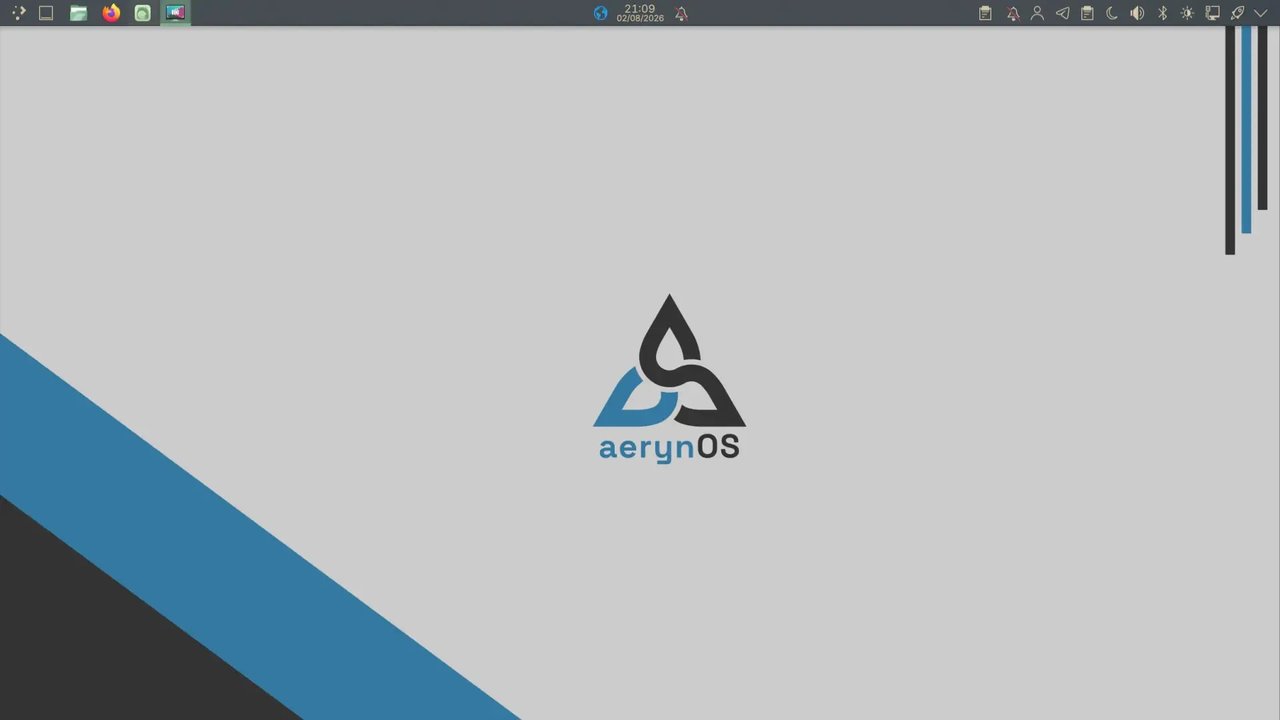
Boot the USB stick on your spare machine. The live environment boots into a GNOME session with the AerynOS wallpaper and the top panel you saw in the earlier screenshot. Open a terminal and run:
sudo lichenlichen walks you through:
- Disk selection. It will list every block device on the system. Pick the disk you want to dedicate to AerynOS — there is no partitioning UI yet, so the whole drive becomes a single AerynOS root with the rest of
blsformesetting up the ESP. - Hostname and locale. Standard prompts.
- User account. You set the password twice. There is no root password prompt — the installer follows the sudo-only model.
- Edition selection. This is the cool part. Even though the live ISO is GNOME,
lichenlets you install GNOME, KDE Plasma, COSMIC, or a “Terminal Only” build that you can then assemble yourself with MangoWC, Niri, Sway, Hyprland, or whatever you prefer. - Package pull.
lichentalks to the unstable channel and pulls the latest set of packages onto your new root. This is where the live / installed divergence closes — the alpha installer is intentionally fetching the absolute newest versions.
Reboot, pull the USB stick, and you should land in a fresh AerynOS session. The first boot will be a little slow because blsforme is settling the BLS entries and moss is finalising the initial transaction.
Driving the system: your first moss commands
The first thing you will want to do after install is get up to date. There is no apt update && apt upgrade incantation here. There is moss sync and there is moss upgrade. They are separate on purpose.
# Sync the local repository cache with the AerynOS CDN
sudo moss sync

# Apply any pending system upgrades as an atomic transaction
sudo moss upgrade

# See what's in the local repository store
moss list installed

# Search for a package
moss search neovim

# Install a package (note: the action verb is "install", not "add")
sudo moss install neovim
If you are upgrading across the YAML-to-KDL repository-format change that landed in 2026.08, you will see this prompt:
sudo moss sync -u-u is “upgrade format”. moss will rewrite your /etc/moss/repo.d/*.yaml files into .kdl, apply the change, and print a diff so you can audit what just happened:
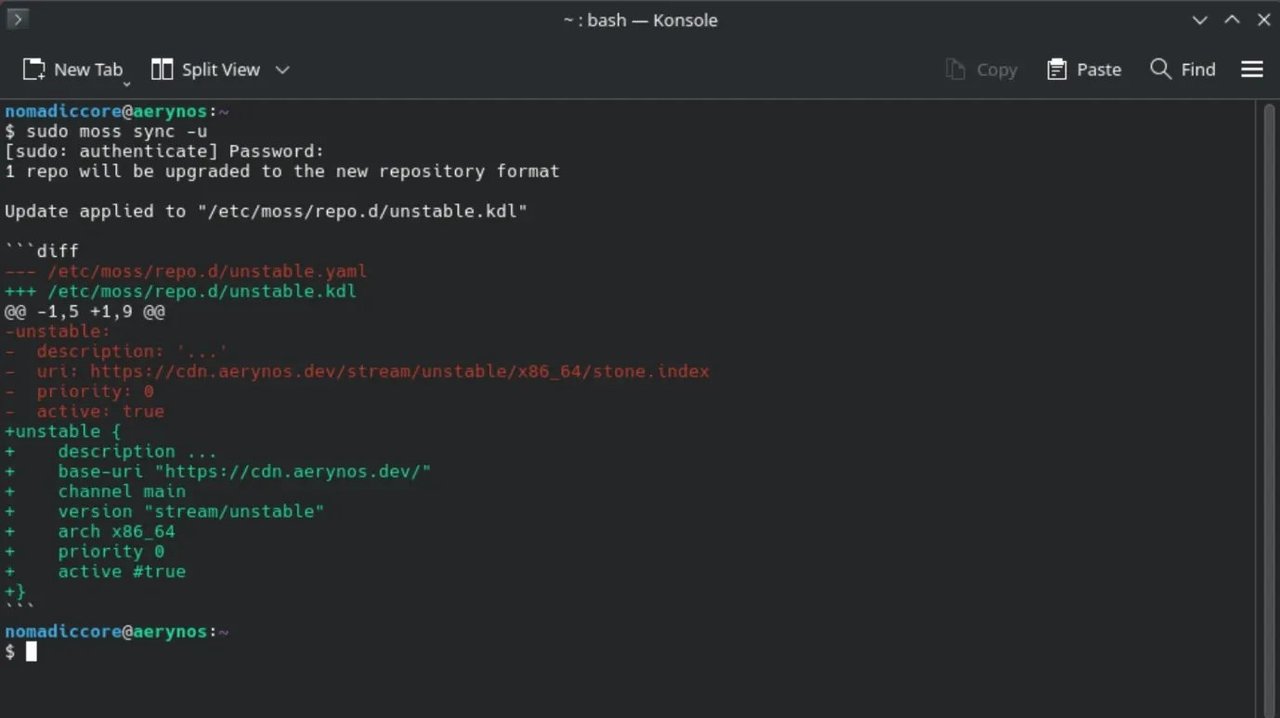
That output is real — pulled straight from a freshly-installed AerynOS 2026.08 system. Note how the diff shows the YAML-style nested block (indentation, colons) being replaced with the KDL-style parenthesised block (unstable { ... }). The base-url and channel keys are new, the uri field is gone (it was redundant with base-url plus channel main plus version "stream/unstable"), and the boolean active true becomes the KDL-style active #true. This is exactly the kind of “no surprise breakage” UX that an atomic system should deliver: the format migration happens inside an atomic transaction, and if anything goes wrong you can roll back to the previous transaction with sudo moss rollback.
The “rolling immutable” mental model
If you are coming from Arch, you will reflexively try to run pacman -U some-local-pkg.tar.zst and discover that moss will refuse to install a package that is not in a configured repository. That is on purpose: AerynOS is moving toward a model where every package in the system comes from a signed repository, the same way NixOS does. There is no AUR. If you need a custom package, the answer is “write a boulder recipe and submit it upstream”, not “slap a tarball into /usr.”
If you are coming from Fedora Silverblue or Endless OS, you will recognise the rollback story. moss keeps every previous transaction in /.moss/root/ indefinitely (subject to garbage collection) and you can boot into any of them from the bootloader. To list available boots:
sudo blsforme listTo roll back to a specific transaction:
sudo moss rollback --to <transaction-id>blsforme rewrites the BLS entries so the rollback transaction is now your default boot. If the rollback itself breaks something, you can roll forward again with sudo moss rollback --to latest. The whole loop is reversible.
Where it still rough
AerynOS 2026.08 is a technical preview, and it behaves like one. A few honest caveats:
- No dual-boot.
lichenwill not install alongside another OS. If you want AerynOS on a laptop that currently dual-boots Linux/Windows, you have to shrink the other partition manually before you boot the live ISO. - x86_64-v2 only. Very old hardware (anything pre-Sandy Bridge / Bulldozer) will not boot the installer.
- No Ventoy. You need Etcher or
dd. - Alpha bugs in COSMIC edition. The Plasma and GNOME editions feel solid; the COSMIC edition is more “interesting” in the Chinese sense.
- Documentation is in flux. The user-facing docs at https://aerynos.dev/aerynos/ are catching up to the 2026.08 release. For the authoritative reference, read the source: the
os-toolsrepo at https://github.com/AerynOS/os-tools, andlichen-installerat https://github.com/AerynOS/lichen-installer.
Who should try AerynOS 2026.08
If you are a Linux power user with a spare drive and a tolerance for alpha bugs, AerynOS 2026.08 is a genuinely novel thing to poke at. The atomic-update model is real, the moss command surface is small and learnable, and the build tooling (boulder, blsforme) is the kind of clean Rust implementation that you wish more distros would adopt. You will not find a usable AUR or Flatpak layer yet — the project is focused on getting the core right first.
If you need a daily-driver Linux today, AerynOS is not there yet. Stick with CachyOS, Fedora Silverblue, or openSUSE Aeon for now and keep an eye on the next release. The team’s roadmap looks aggressive, and the pace of 2026.08 — OpenZFS in, community phase open, KDL migration shipped — suggests 2026.09 or 2026.10 could be the one to revisit.
Either way, it is the most interesting small-distro release of 2026 so far. Spin it up on a spare SSD over the weekend. You will learn something about how a modern Linux can be put together if nothing else.
Resources
- Official homepage: https://aerynos.com/
- 2026.08 release announcement: https://aerynos.com/blog/2026/08/02/solid-foundations-are-leading-to-expanding-horizons/
- DistroWatch entry: https://distrowatch.com/?newsid=12910
mossdocumentation: https://aerynos.com/tooling/moss/os-toolssource (moss + boulder): https://github.com/AerynOS/os-toolslicheninstaller source: https://github.com/AerynOS/lichen-installer- Community discussion: https://github.com/orgs/AerynOS/discussions
Comments