
If you’ve spent an afternoon gluing Waybar + Swaync + wofi + swaylock + swaybg + some Python IPC just to get a basic-looking desktop, Noctalia is what you were trying to build. This article tells you what it is, what v5 changed (a lot), where it works, and where it still isn’t the answer.
The Wayland ecosystem in 2026 has excellent window managers but a fragmented “shell” layer. You pick Hyprland or Niri as your compositor; then you need a status bar (Waybar, AGS, Ironbar, end-4’s bespoke, Quickshell configs), a launcher (wofi, fuzzel, bemenu, walker), a notification daemon (Swaync, Mako, fnott), a wallpaper tool (swaybg, swww, wlgreet), a lock screen (swaylock, gtklock), and a session menu (wlogout or hand-rolled). Every one of those has its own config format and its own opinions about how data flows between them. The result is a working desktop that takes a weekend to assemble and forever to debug. Noctalia is one shell layer that owns all of those surfaces, designed to sit on top of your chosen compositor without taking over window management.
It’s also a project that made a big architectural change between v4 (Quickshell-based, QML) and v5 (a C++ rewrite of the rendering layer, dropping Qt). As of this article, v5 is in early alpha — usable, but with breaking-change expectations between versions. This article covers v5.
What Noctalia is, in one sentence
A Wayland desktop shell (bars, dock, launcher, notifications, control center, wallpaper picker, lock screen, OSDs, tray, widgets, clipboard history) for any of 8+ Wayland compositors, configured in TOML with hot reload.
If you already have Hyprland / Niri / Sway running and just want a beautiful unified shell on top, Noctalia is the answer. If you want to learn Wayland protocol details by writing dotfiles in five different config formats, it’s not.
What v5 changed (and why v4 isn’t the answer anymore)
Noctalia v4 was built on Quickshell (QtQuick + QML). It worked but had the usual Qt-on-the-shell tax: large binary, slow startup, an extra dependency to learn. v5 is a major architectural rewrite that:
- Drops Qt entirely. v5’s rendering is hand-written C++ on OpenGL ES. The GitHub repo description now says “built directly on Wayland and OpenGL ES with no Qt or GTK dependency.”
- Replaces QML config with TOML. v4 used JSON; v5 uses TOML with hot reload and a GUI-managed override layer.
- Reorganizes the IPC model. What was hand-rolled in v4 by community config authors is now first-class in v5.
- Adds proper compositor-backend architecture. v5 has first-party integrations for Niri, Hyprland, Sway, Scroll, Mango, Labwc, Triad, dwl — through compositor-specific backends where needed and
ext-workspace-v1where the compositors implement it.
There is no in-place upgrade path from v4 → v5. The docs say v4 and v5 can coexist on the same system because the config formats are different and the package names don’t conflict. But you’ll need to redo your keybindings in the compositor config (they’re what launch Noctalia components).
What’s in the shell
The component list as of v5-alpha, from the project’s own README:
Bar surfaces (multi-monitor)
- Top bar with configurable widgets: taskbar, workspaces, system tray, media, network, battery, brightness, weather, clock, clipboard, plus custom script-backed widgets.
- Dock (separate surface; can be hidden automatically)
- Launcher with fuzzy search (replaces wofi / fuzzel)
Service surfaces
- Notification toasts and history (replaces Swaync / Mako)
- Control center — quick toggles for Wi-Fi, Bluetooth, audio, mic mute, night light, dark mode, theme switcher, accent color (replaces homegrown quickshell panels)
- Wallpaper picker with Wallhaven integration and a “color generated from wallpaper” mode
- OSD overlays for volume, brightness, mic
- Lock screen
- Session panel — power-off, reboot, lock, suspend, hibernate, logout
- Clipboard history (replaces clipman / cliphist / copyq)
- Tray integration (StatusNotifierItem support)
- Desktop widgets — clock, weather, media player, plus what plugins add
Config
- TOML with hot reload (save the file, the change is live)
- GUI-managed overrides for settings you’d normally script
- Theme / palette system with predefined color schemes
- Template-application story (apply someone’s curated bar from a paste / gist)
This is what replaces the layer of services Waybar + Swaync + wofi + swaybg + swaylock were each doing. Noctalia is one project, one config format, one rendering thread.

A picture of what you’re getting
Before walking through the install and config, here’s what Noctalia actually looks like running on a Hyprland + Niri system. All screenshots are from the official v5 showcase (project MIT-licensed).
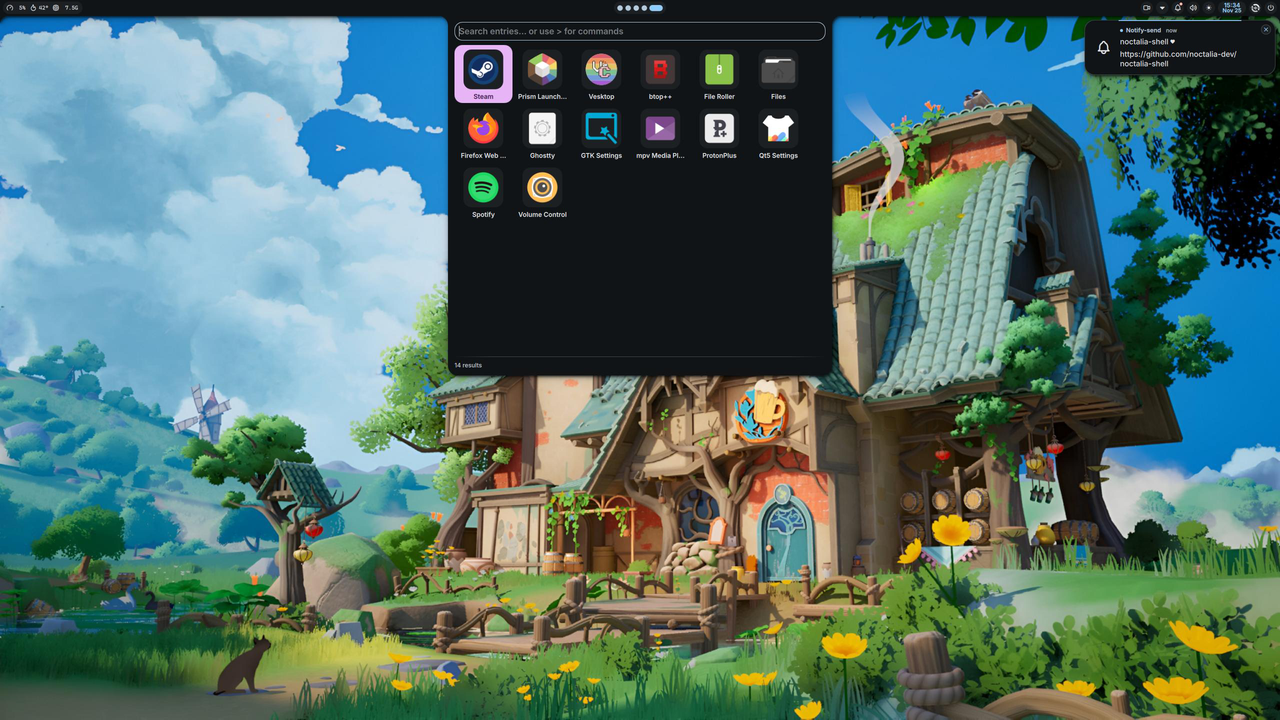
Dark theme, launcher open + notification panel expanded — the search box on top with Search entries… or use > for commands is the launcher; the small panel docked in the top-right corner is the notification history pulled out for review.
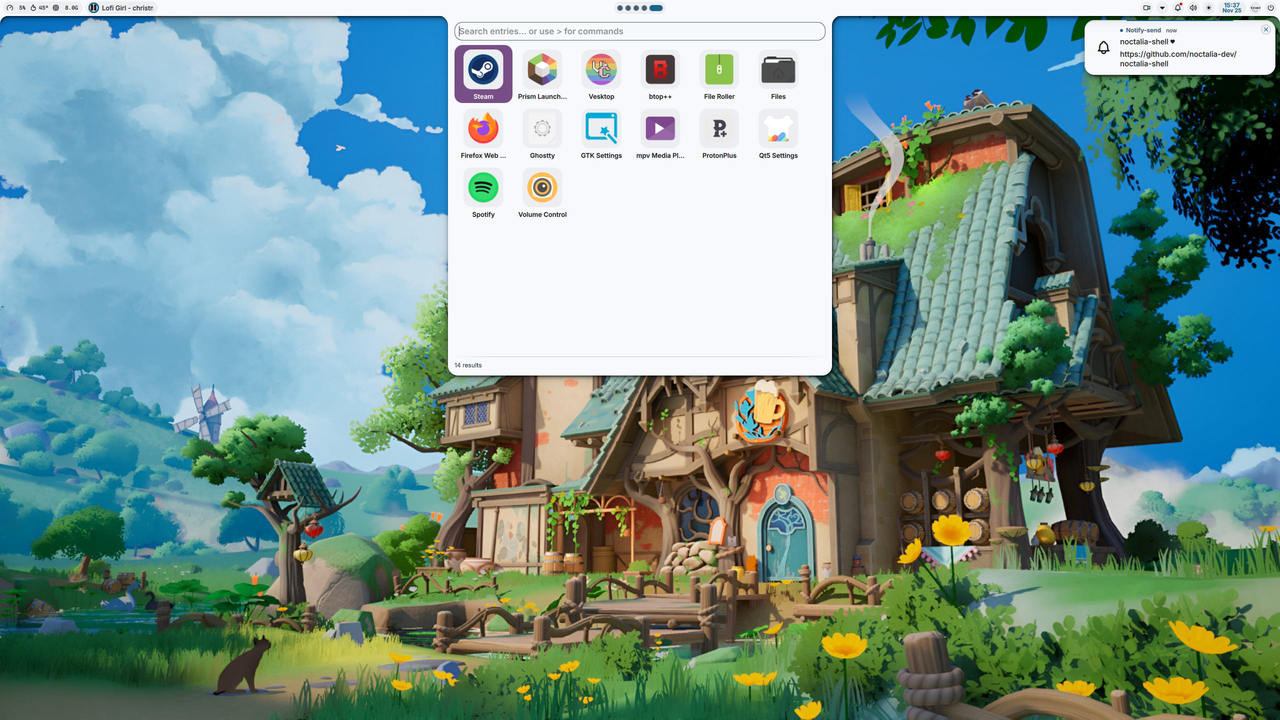
Light theme, same launcher state — automatic theme switcher (per upstream README: “automatic color generation from your wallpaper”) paired with the system dark/light signal.
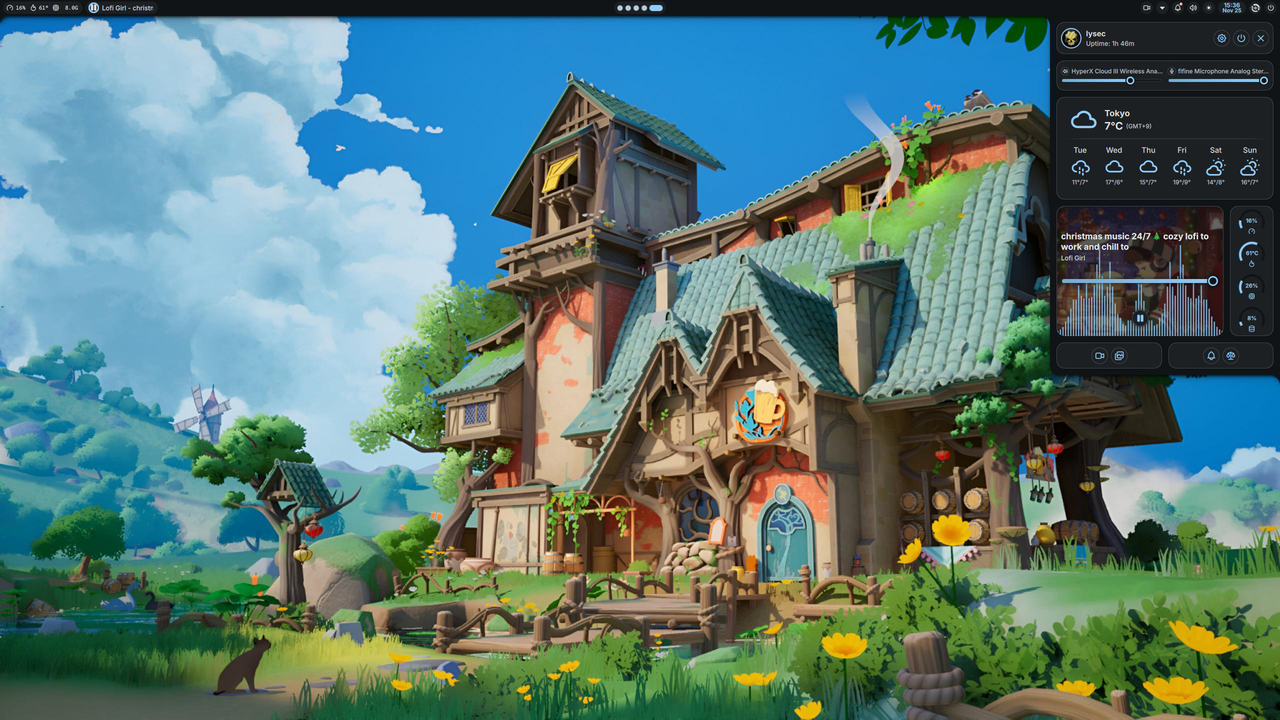
Control center expanded — the panel on the right shows weather (lysec, Tokyo), 5-day forecast, system monitoring (CPU/memory/65°C CPU temp), media controls, quick toggles. This is what replaces the homegrown Quickshell panel that every other rice has to author by hand.
Wallpaper picker + color-from-wallpaper — the wallpaper UI in Noctalia v5 ties the whole theme palette to whatever image you set, so changing wallpaper updates the accent everywhere.
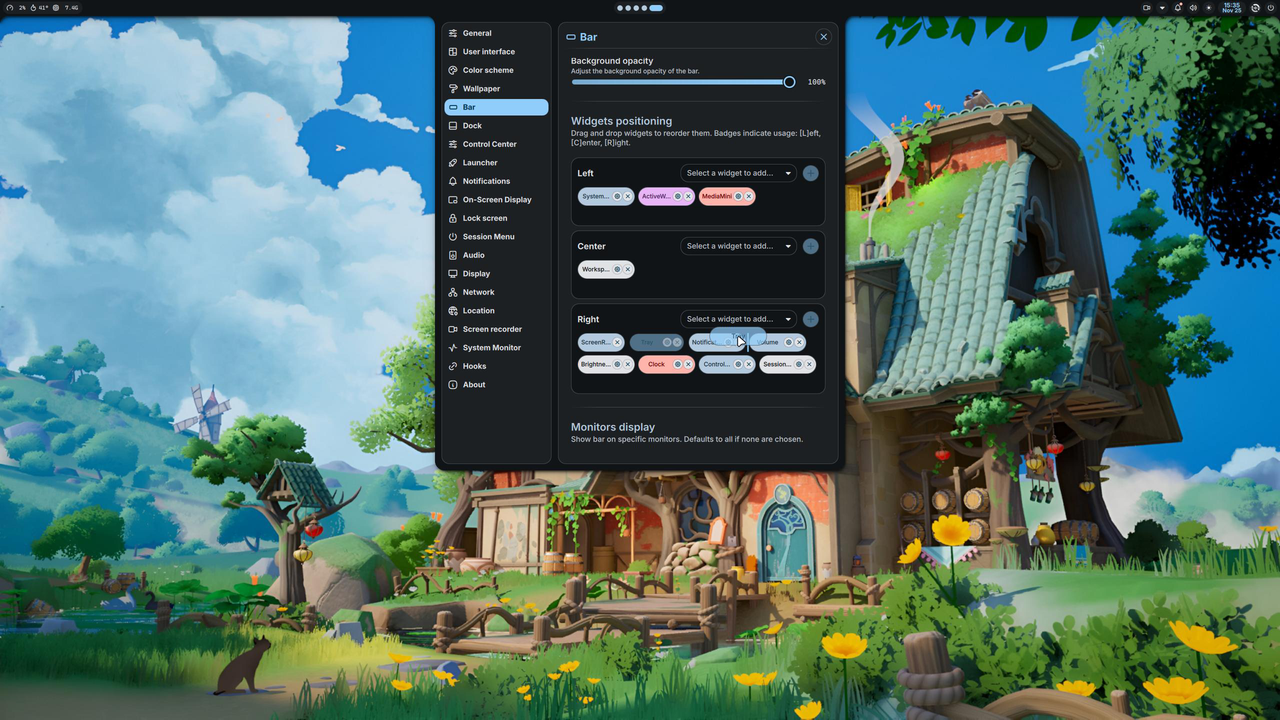
Light theme, notification + lock screen setup — same theme system, different state.
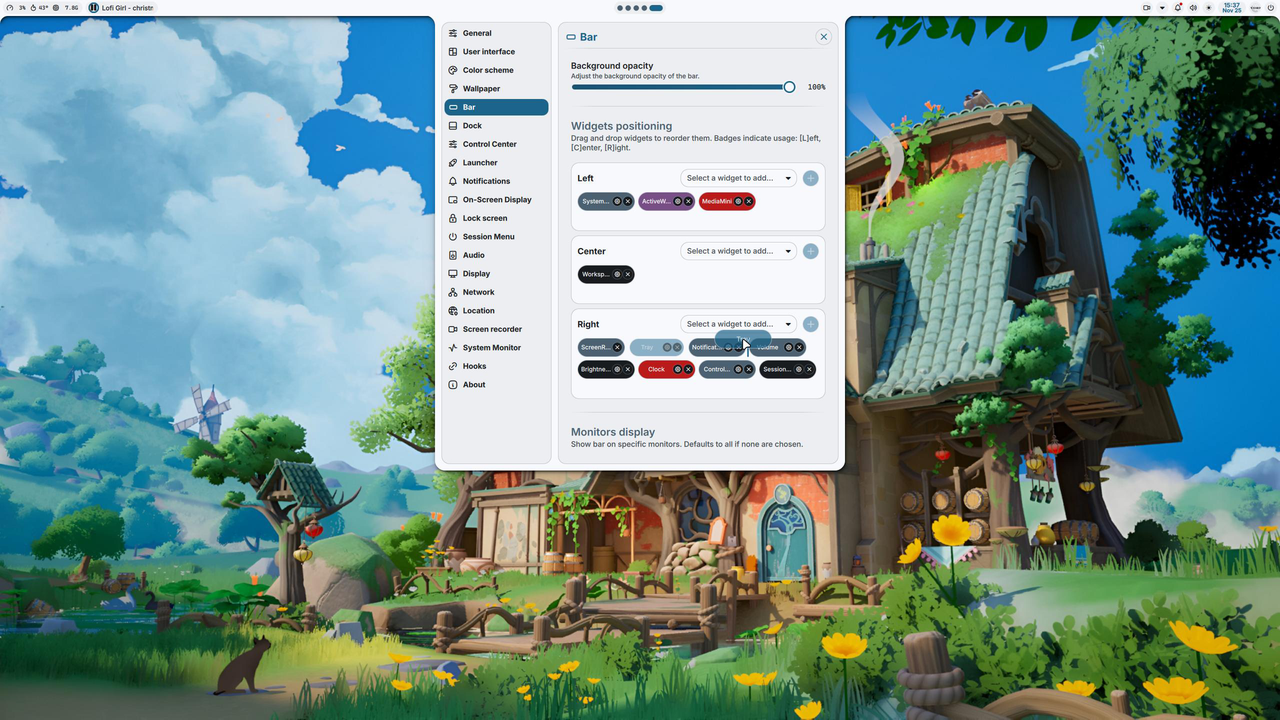
Dark theme, idle — what you see most of the time. Bar with workspaces + media + system tray.
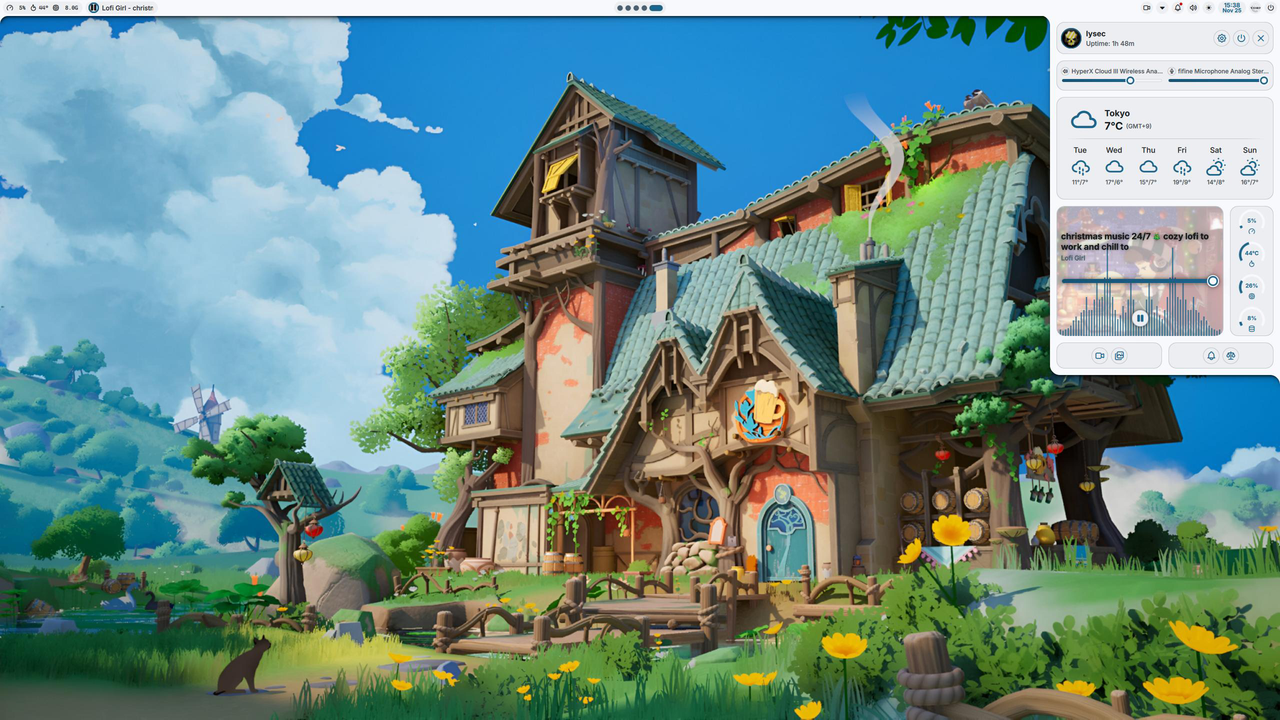
What it doesn’t do (the boundary to set up)
The project’s own scope statement is explicit:
Noctalia is a desktop shell, not a full desktop environment. Window management, tiling, file management, removable-drive mounting, and screen mirroring/casting belong to the compositor, dedicated desktop applications, or system services. Display/login greeter support lives in the separate Noctalia Greeter project.
Practically:
- No window manager. Compose with Hyprland / Niri / Sway / etc.
- No file manager. Use Nautilus, Dolphin, or Thunar.
- No greeter / login manager. That’s the
noctalia-greetersibling project, separate repo, separate install. - No display server config. Wayland sessions are already a thing; Noctalia doesn’t replace login.
- No compositing. The compositor does that. Noctalia positions UI on compositor-provided layer-shell surfaces.
If you were hoping for a single install that replaces Hyprland + your bar + your launcher + your greeter, this only replaces the shell layer. You’d still need to install Hyprland (or equivalent) and choose a separate greeter.
Install — the canonical paths
Arch Linux / Manjaro / EndeavourOS / CachyOS
paru -S noctalia-gitAUR is the only officially-blessed packaging path on Arch. The -git suffix tracks main branch; there’s also noctalia stable if you want less churn.
Fedora 44+
sudo dnf install noctaliaFedora ships in official repos as of Fedora 44 (2025). Older Fedora versions can use the Hyprland Community Project (COPR):
sudo dnf copr enable lionheartp/Hyprland
sudo dnf install noctalia-git
Debian 13 (Trixie) / Ubuntu 26.04
wget https://pkg.noctalia.dev/deb/nickh-archive-keyring.deb && sudo dpkg -i nickh-archive-keyring.deb
sudo wget -O /etc/apt/sources.list.d/noctalia-trixie.sources https://pkg.noctalia.dev/deb/noctalia-trixie.sources
sudo apt update && sudo apt install noctalia
The docs only list amd64 builds for the Debian/Ubuntu path. There are ARM builds at the AUR level but not in the apt repo; check the v5 release notes for newer status.
NixOS
Noctalia ships a flake. Add to your inputs and overlay on nixpkgs:
inputs.noctalia.url = "github:noctalia-dev/noctalia";It’s also installable via the GNU Guix channel and on openSUSE Tumbleweed + Slowroll via OBS (Leap 16 can’t build v5 because sdbus-c++ in the distro is still on v1.6.0; v5 requires ≥ v2.x).
Manual install (any Linux)
Works on any distro that has the deps listed in the install docs. The list is non-trivial — meson, gcc, just, wayland, wayland-protocols, libglvnd, freetype2, fontconfig, cairo, pango, libxkbcommon, glib2, sdbus-cpp ≥ 2.0, libpipewire, wireplumber, polkit, pam, curl, libwebp, librsvg, libqalculate, libxml2, md4c, tomlplusplus, nlohmann-json, stb, plus optional jemalloc. Some libraries (Wuffs, nanosvg, Luau, dr_wav, fzy, stb_image_resize2, Material Color Utilities) are vendored so you don’t need them system-wide.
If you’re on a non-listed distro, this is fine; if you’re on a listed distro, use the distro package so you get security updates.
A first-run configuration
Noctalia ships a setup wizard that runs on first launch. It asks for: which compositor you’re on, your preferred keybind (Hyprland-style vs QWERTY-position vs custom), display layout, color palette preference, accent color. The generated config is real TOML that you can edit at ~/.config/noctalia/config.toml.
# ~/.config/noctalia/config.toml
[general]
compositor = "hyprland"
hotkey_open_launcher = "<super> space"
hotkey_open_control_center = "<super> c"
hotkey_open_wifi_panel = "<super> w"

[bar]
position = "top"
height = 38
background_opacity = 0.85
left_widgets = ["workspaces", "active_window"]
center_widgets = ["media"]
right_widgets = ["clock", "tray", "battery", "network", "volume"]

[theme]
mode = "auto"           # light / dark / auto
accent = "lavender"
palette = "noctalia-lavender"

[notifications]
do_not_disturb = false
max_history = 25
position = "top-right"
The hot reload kicks in the moment you save. No kill; restart loop.
The plugin layer
Noctalia v5 ships with 9 official plugins and a plugin spec for third parties. The v4 community had 132 plugins — most haven’t yet been ported but the migration is documented and many maintainers ported theirs in the first few months of v5-alpha.
What plugins can do (per the project’s own scope notes):
- Add bar widgets (
ram-info,cpu-temp, etc.) - Add launcher providers (web search, calculator integrations)
- Desktop widgets (clock faces, system monitors)
- Shortcut panels (quick script invocation)
- Background services (Pomodoro timers, weather poller replacements)
- Compositor-specific extras (Niri workspace rules, Hyprland dispatchers)
- Hardware-specific controls (RGB, fan curves, custom keyboards)
- Third-party service integrations (Mastodon, IMAP, custom APIs)
The plugin system is one of the most distinctive things about Noctalia vs Waybar-style setups. If you’ve ever wanted to add a new widget to your bar without forking Waybar and rewriting half its config, plugins are the answer.
How it compares (the honest version)
| Need it for | Try this first | Why |
|---|---|---|
| One shell layer on Hyprland / Niri / Sway, full feature set, native support | Noctalia | Native integrations, hot reload, plugin ecosystem |
| Maximum control, willing to learn QML + shell scripting | Quickshell direct (e.g., end-4/dots-hyprland dotfiles) |
More knobs to twist, slower moving target |
| Minimal bar, no fuss, Niri-only | Custom Waybar setup | Smaller surface, smaller cognitive load |
| Floor of needed panels (bar + launcher) on Sway | waybar + wofi + swaync |
Already installed on most distros |
| Aesthetic-over-functionality rice | caelestia-dots or DankMaterialShell | More visual polish in default config |
If your goal is “configured Wayland desktop without a 400-line hyprland.conf plus a 800-line waybar/style.css plus a 200-line ${WAYLAND_FOO} startup script,” Noctalia is the only thing in this list that does that in one config file.
The current state (July 2026 — read this before installing)
- v5 is in early alpha. Config-breaking changes still expected between alphas. If you don’t want to follow breaking-change release notes, wait a few months or pin a specific release tag.
- v4 still installs and works for users who want a stable target. v4 has the 132-plugin ecosystem; v5 doesn’t yet. But v4 is the legacy branch going forward — the v5 rewrite is where active development lands.
- The “no Qt” claim is true for the rendering path, but Quickshell tools and feature sets are still useful for power users running custom shells. They don’t get Noctalia’s polish, but they get unbounded extensibility.
- Most compositor issues are at the protocol layer. Niri’s
ext-workspace-v1is mature; Hyprland’s hyprland-ipc backend covers workspaces; Sway’s zwlr-layer-shell is solid. The “reduced workspace integration” risk for less-popular compositors (Triad, dwl) is mostly a manual config job, not a bug.
What I’d skip
A few things worth mentioning so you don’t burn time:
- Don’t try to use Noctalia as your greeter. That’s the
noctalia-greeterrepo and it’s separate. Use a real one (greetd-based, sddm, whatever your distro provides). - Don’t try to make
noctaliafrom a distro package your only install source on Debian — the APT repo is AMD64-only for now. The AUR on Arch is the best-supported packaging path; Arch users should always useparu. - Don’t port your v4 config and expect it to work. v4 is JSON-shaped; v5 is TOML-shaped. The doc has a migration cheatsheet but plan to retune.
What next
If you’ve decided Noctalia is the move, the next useful write-up is a comparative review of three QML/C++ shells that target the same audience — Noctalia vs DankMaterialShell vs caelestia-dots — for anyone who wants the visual polish of a caelestia-dots rice but the lighter config of Noctalia, and is willing to pay the “compose with Quickshell” tax. Tell me in the comments.
Sources verified July 2026: github.com/noctalia-dev/noctalia (8.5k★ / 605 forks / 4348 commits, MIT, updated weekly), noctalia.dev homepage, docs.noctalia.dev/v5/getting-started/installation/ (per-distribution install commands, AMD64-only APT note for Debian), quickshell.org for Quickshell 0.3.0 release timestamp (2026-05-04), github.com/topics/quickshell for positioning alongside caelestia-dots (10.5k★) and DankMaterialShell (7.2k★).
Comments