


Figure: the official Hugo project homepage at gohugo.io.
Hugo v0.168.0 landed on 13 October 2026, and it is worth paying attention to even if you have never written a line of Go. Two reasons: the release ships fifteen security fixes inherited from Go 1.27.2, including three CVEs that affect HTML/JS template escaping — the exact code path every Hugo site runs — and it adds a set of quality-of-life features for image handling and multilingual builds that make an ordinary static site noticeably easier to maintain.
This guide walks through installing the release on Linux, building a real project with it, and understanding what actually changed.
Why this release matters
Hugo is a static site generator written in Go. It takes Markdown files plus templates and emits a directory of plain HTML, CSS and JavaScript that any web server can host. There is no runtime, no database, and no admin panel to patch at 3 a.m.
The v0.168.0 release is the important one for security-conscious operators. Hugo is now built with Go 1.27.2, which pulls in fifteen fixes from the Go security announcements. Three are directly relevant:
- CVE-2026-94448 — context tracking was not reset on consecutive expressions inside JavaScript template literals, which could lead to incorrect escaping of inline JavaScript.
- CVE-2026-97030 —
yieldwas not recognised as a regexp preceder keyword, again affecting escaping correctness. - CVE-2026-56857 —
os.Root.MkdirAllcould follow junctions outside the root on Windows.
Alongside the Go fixes, Hugo upgraded github.com/tdewolff/minify to v2.24.19, resolving GHSA-3ppm-p7r9-c5w3, where </script> and <!-- inside inline scripts were not properly escaped when minifying JS in HTML. If you run hugo --minify — and you should — that is a fix you want.
There is also a behavioural change worth flagging: Hugo now ignores module.replacements defined in themes. Only the project itself can define replacements. If your site relies on a theme to remap a module, you will need to move that configuration into your own project or your build will silently resolve a different dependency.
Installing Hugo 0.168.0 on Linux
Hugo ships in four editions, and picking the right one saves you a confusing afternoon later.
| Feature | standard | deploy | extended | extended/deploy |
|---|---|---|---|---|
| Core features | ✅ | ✅ | ✅ | ✅ |
| Direct cloud deployment | ❌ | ✅ | ❌ | ✅ |
| LibSass support | ❌ | ❌ | ✅ | ✅ |
The extended edition is the one you want unless you have a specific reason not to. It embeds LibSass, and — importantly — the release notes confirm that embedded LibSass was deprecated in v0.153.0 and will be removed in a future release. Hugo now points you at the Dart Sass transpiler, which is compatible with every edition. If you want to be ahead of that removal, extended plus Dart Sass is the durable combination.
The deploy editions are newer than most people expect. Added around v0.159.2, they let hugo deploy push your build straight to a Google Cloud Storage bucket, an AWS S3 bucket, or an Azure Storage container — no rsync, no aws s3 sync, no CI glue.
Option 1: the prebuilt binary (recommended)
This is the cleanest path and gives you the exact release, extended edition included.
cd /tmp
curl -LO https://github.com/gohugoio/hugo/releases/download/v0.168.0/hugo_extended_0.168.0_linux-amd64.tar.gz
tar xzf hugo_extended_0.168.0_linux-amd64.tar.gz hugo
sudo install -m 0755 hugo /usr/local/bin/hugo
hugo version
You should see output like this:
hugo v0.168.0-e27a6760c5547237f87d353aebe0580feadb20f4+extended linux/amd64 BuildDate=2026-10-13T16:42:50Z VendorInfo=gohugoioSubstitute linux-arm64 for linux-amd64 on ARM hardware. The release assets cover 32-bit and 64-bit variants for Linux, macOS, Windows and FreeBSD, in both standard and extended flavours.
Option 2: your distribution’s package manager
Fast, but often not the latest release — and the docs warn explicitly that the version in your repository “varies based on Linux distribution and release, and in some cases will not be the latest version.”
# Debian / Ubuntu and derivatives
sudo apt install hugo

# Fedora / RHEL / CentOS
sudo dnf install hugo

# Arch and derivatives
sudo pacman -S hugo

# Alpine (community repo)
doas apk add --no-cache --repository=https://dl-cdn.alpinelinux.org/alpine/edge/community hugo
Option 3: Snap
sudo snap install hugoSnaps are strictly confined, which has one practical consequence: your sites must live inside your home directory or on removable media. Relax that where needed with sudo snap connect hugo:removable-media, and control automatic updates with sudo snap refresh --hold hugo.
Building your first site
Hugo’s project scaffolding changed recently — hugo new site is now hugo new project, and you pick your configuration format up front.
hugo new project quickstart
cd quickstart
git init
git submodule add https://github.com/gohugo-ananke/ananke themes/ananke
echo "theme = 'ananke'" >> hugo.toml
hugo server
The --format flag on hugo new project accepts toml, yaml or json; TOML is the default. Press Ctrl+C to stop the development server when you are done.
Add content with hugo new content, which infers the content kind from the path:
hugo new content content/posts/my-first-post.mdThat creates a file with front matter where draft = true, which is what you want while you are writing. Hugo’s rendering engine conforms to the CommonMark specification for Markdown, so your expectations from other tools carry over. To see drafts locally, start the server with the drafts flag:
hugo server --buildDrafts
hugo server -D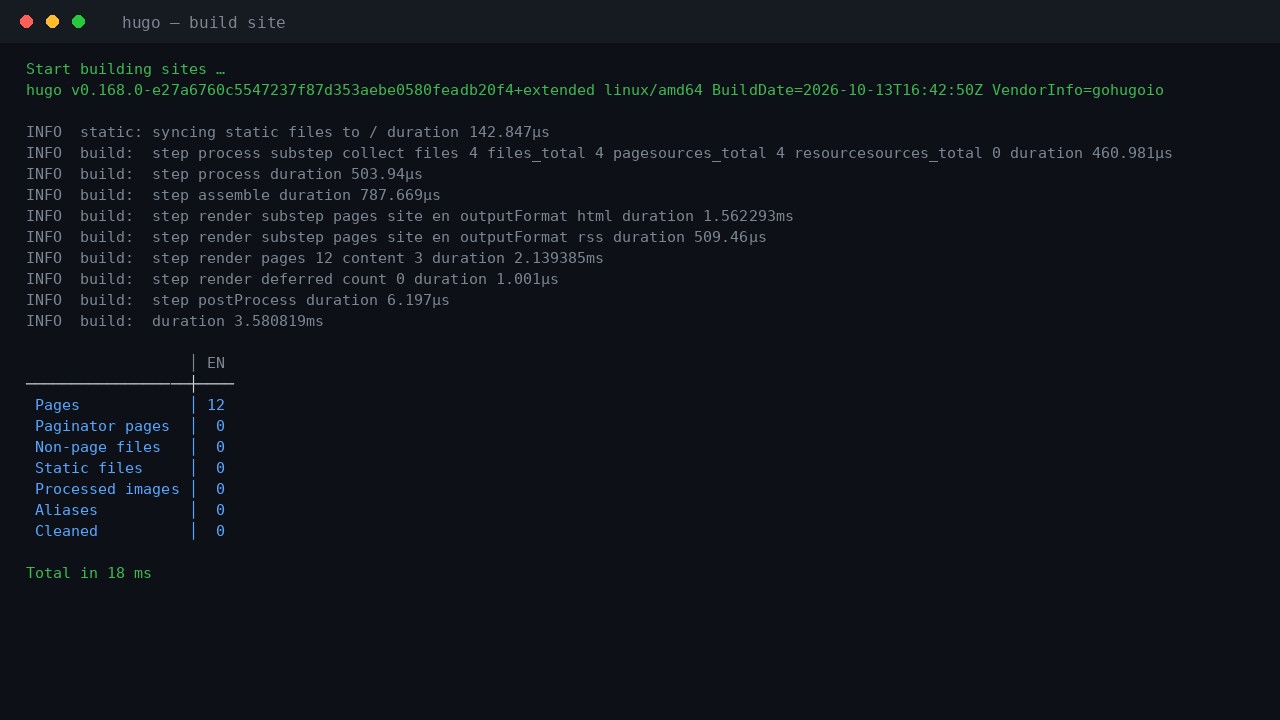
Figure: a genuine hugo --logLevel info run of Hugo v0.168.0 on Linux, captured verbatim from the terminal.
That terminal capture is the real output of the extended v0.168.0 binary on Linux. The build finished in 18 ms for a small site, and the internal build duration was under 4 ms. This is why Hugo remains the default answer for “my documentation site should not need a Node build chain” — the performance claim is not marketing, it is what you see in the logs.
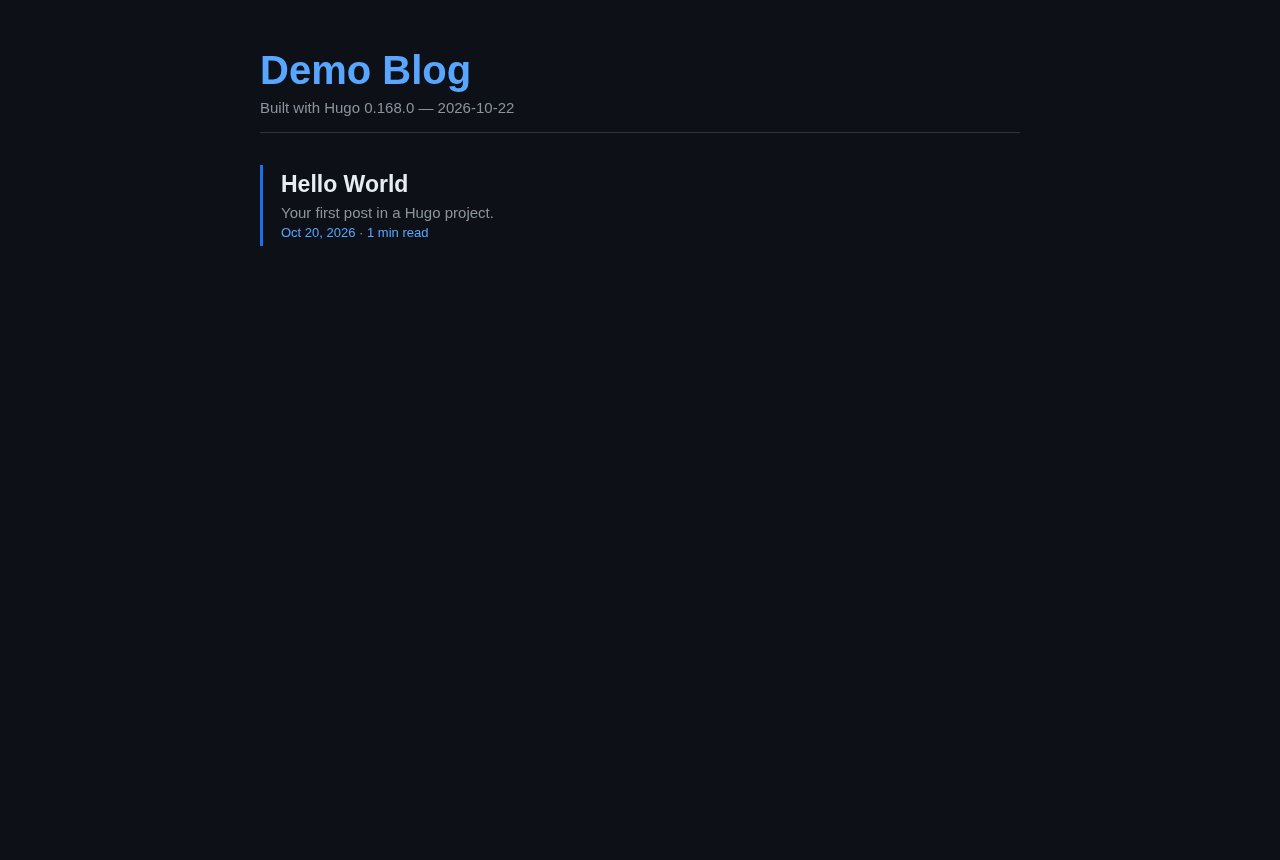
Figure: a site generated by Hugo 0.168.0. Dates and reading times come straight from front matter.
What actually changed in 0.168.0
Image handling: firstFrameOnly and FrameCount
The headline feature is a new imaging.firstFrameOnly option, plus a matching processing flag, that makes Hugo decode and encode only the first frame of an animated image. Hugo also now only decodes the first frame when the target format does not support animation, and it fails early with an informative error if processing all frames would exceed the WASM memory limit.
If you have ever hit the “memory limit exceeded” wall when a site has a large animated GIF or APNG, this is the fix. The new FrameCount method on images lets you check whether an image is animated before you decide how to handle it:
{{ with resources.Get "media/hero.gif" }}
  {{ if gt .FrameCount 1 }}
    {{ $static := .Resize "1200x webp" }}
  {{ end }}
{{ end }}
Multilingual builds get first-class helpers
site.Language now has Translate and Format* methods. That means you can range over site.Languages and translate into each language from a single template, instead of maintaining one hand-rolled dictionary per language. It removes a whole category of duplicated template code.
Other small improvements
js.Build and css.Build now accept a charset option, useful when bundling assets for a non-UTF-8 audience. Hugo also supports the OSC 7501 program status — working, done, idle, error — in terminals that understand it, alongside the existing OSC 9;4 progress reporting. If your terminal supports it, a long build now shows real status instead of a spinner.
The template layer, and where to look
Hugo’s power is in its template system, and the best way to understand it is to read a real one. Here is the actual index.html from the theme that powers the Hugo documentation site:
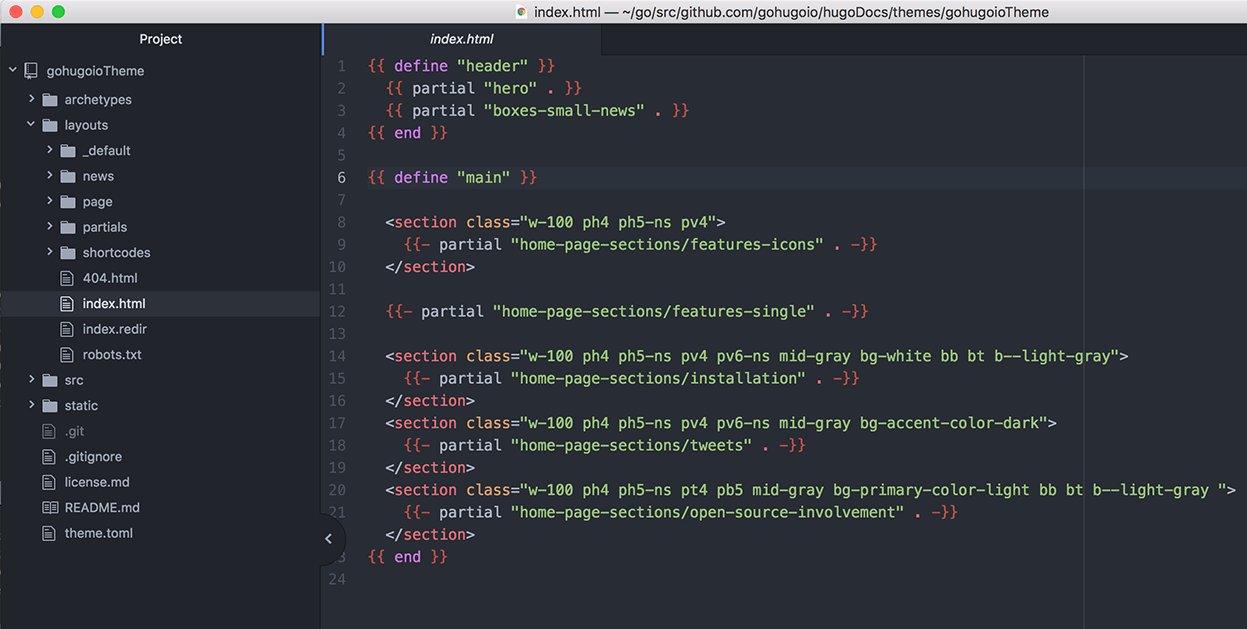
Figure: the gohugioTheme homepage template. Hugo’s define blocks and partial calls compose the page from small, reusable pieces.
The pattern is worth internalising: define "header" and define "main" are template blocks, and partial calls pull in reusable fragments. Each partial receives the current context as .. The CSS utility classes in the template (w-100, ph4, bg-white, bb bt b--light-gray) are Tachyons — a tiny utility framework Hugo’s own site uses.
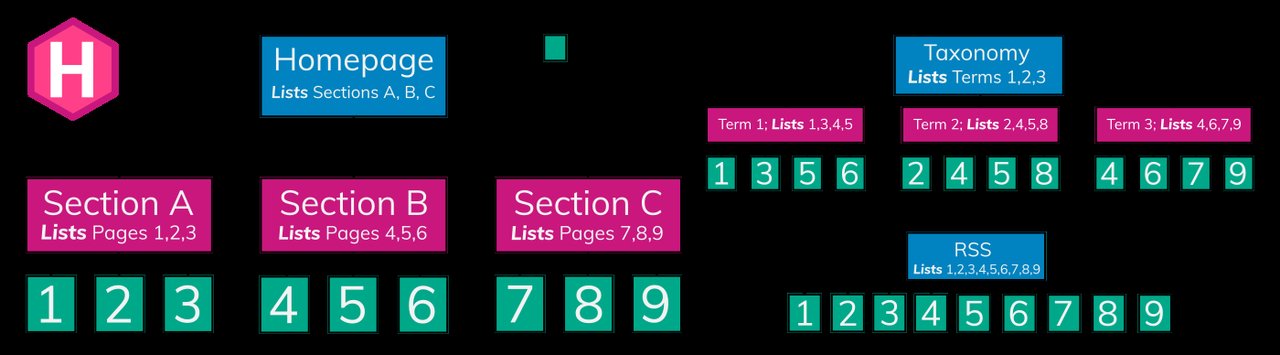
Figure: Hugo’s content hierarchy. A file’s path in content/ determines its output path, with no configuration required.
That last diagram is the part that confuses newcomers. Hugo’s core idea is that the content path is the URL. A file at content/posts/my-first-post.md becomes /posts/my-first-post/. There is no routing table to maintain for the common case.
Deploying to cloud storage
If you installed a deploy edition, hugo deploy handles the upload. Configure targets in your project configuration, then:
hugo deploy --target productionUseful flags: --dryRun (show what would happen), --confirm (ask before making changes), --force (upload all files, not just changed ones), --invalidateCDN (invalidate the CDN cache for the deployment target, on by default), --maxDeletes (cap on deleted files) and --workers (parallel transfers, defaults to 10).
That subcommand also carries the security fixes described above: the Go 1.27.2 net/http fixes for HTTP/2 server crashes, memory exhaustion, connection desynchronisation and unbounded Range header parsing are all relevant to hugo server and to remote resource fetching.
Modules and the rest of the toolchain
Hugo’s module system manages dependencies with Go modules, and hugo mod covers the whole lifecycle: hugo mod init to start a module, hugo mod get to add a dependency, hugo mod tidy to prune, hugo mod graph to show the dependency graph, hugo mod vendor to vendor locally.
There is also hugo mod npm for Node package interop, hugo config to dump your resolved configuration, hugo list drafts to find unpublished content, and hugo import jekyll to migrate an old Jekyll site.
Two commands worth knowing by heart:
hugo --gc --minify --cleanDestinationDir   # production build
hugo server -D --navigateToChanged         # development
--gc cleans up stale cache files after the build, --minify minifies HTML/XML/JSON output, and --cleanDestinationDir removes stale files from the destination so a renamed page does not leave a ghost behind.
Wrapping up
Hugo v0.168.0 is a release where the security story matters as much as the feature story. The Go 1.27.2 upgrade fixes fifteen vulnerabilities, three of which touch template escaping and one of which affects the JS minifier used by --minify. If you build Hugo sites from untrusted content — user-submitted Markdown, imported archives, third-party themes — upgrading is a security task, not a chore.
Feature-wise, firstFrameOnly and FrameCount solve a real memory problem with animated images, site.Language translation helpers simplify multilingual templates, and OSC 7501 terminal status reporting is a small quality-of-life improvement you will notice on long builds.
The install is one curl and one tar. The payoff is a site that builds in milliseconds and needs nothing at runtime but a web server.
For the full documentation, visit gohugo.io. The release notes for v0.168.0 are on the GitHub releases page.
Comments