
AudioCapture / ASRClient / OverlayWindow — how three modules work together.
This is part 6/8 of the TUX IM Dev Log: From Zero to 0.1 series.
Part 6 · Making Chinese Input “Talk” — ASR Speech Input Subsystem
Pinyin, Wubi, and mixed input are all keyboard input. Voice input is a different paradigm: the user holds down a key, speaks a sentence, and the engine converts speech to text on the screen. This post covers how TUX IM’s ASR subsystem integrates this workflow into the IBus engine.
Why Cloud API Instead of Local
Let’s start with a non-technical decision: TUX IM does not do local speech recognition.
- Local ASR requires a trained acoustic model (hundreds of MB) and inference runtime. Python-based local ASR is slow with poor accuracy.
- Cloud APIs (OpenAI Whisper, Google Speech, Azure) offer great accuracy at low cost.
- TUX IM’s positioning is an input method engine, not an ASR system — ASR providers should be pluggable.
Design principle: The ASR subsystem is an independent, pluggable subsystem. The core engine (engine.py) doesn’t call ASR directly; it does so through ASRHandler, the coordinator.
How Three Modules Work Together
The ASR subsystem has three modules (tux_im/asr/):
- AudioCapture (capture.py) — records from microphone, stores as WAV bytes.
- ASRClient (client.py) — POSTs WAV byte stream to cloud API, returns transcription text.
- OverlayWindow (overlay.py) — a GTK floating window showing recording status + transcription result.
These three modules don’t call each other directly — ASRHandler (handler.py) is the coordinator.
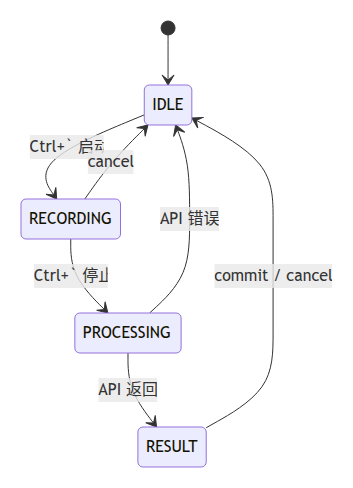
ASRHandler: State Machine
ASRState enum:
class ASRState(StrEnum):
    IDLE = "idle"
    RECORDING = "recording"
    PROCESSING = "processing"
    RESULT = "result"
State flow:
- User presses Ctrl+` (start_asr shortcut) → ASRHandler.start()
- IDLE → RECORDING: start AudioCapture, show overlay (“🔴 Recording…”)
- User presses Ctrl+` again → ASRHandler.stop()
- RECORDING → PROCESSING: stop recording, call ASRClient for transcription, overlay shows “⏳ Transcribing…”
- PROCESSING → RESULT: receive API response, overlay shows transcribed text.
- User presses Enter/Ctrl+` → ASRHandler.commit(): text committed to focused application via callback.
Overlay’s “Don’t Steal Focus” Design
The ASR overlay is a GTK window floating in the middle of the screen showing current recording status. It must:
- Appear without stealing focus (user focus stays on the editor).
- Not block the input area when the user continues typing.
- Allow the user to preview the transcription before deciding whether to commit.
Key code (simplified):
class OverlayWindow:
    def __init__(self):
        # Set window type to popup, no decoration
        self.set_type_hint(Gdk.WindowTypeHint.POPUP_MENU)
        # Don't accept focus
        self.set_accept_focus(False)
        # Stay on top of all windows
        self.set_keep_above(True)
The overlay shows status text like “🔴 Recording…”, “⏳ Transcribing…”, or the transcribed text for user preview. It auto-hides after commit or timeout.
Comments