
TUX IM started from 5 files, 132 lines of Python.
This is part 1/8 of the TUX IM Dev Log: From Zero to 0.1 series.
Part 1 · From an Empty Repo to the First Character ‘Di’ — Why I Rewrote an Input Method
Prologue: Why an Input Method?
In spring 2026, I was typing on a Linux desktop when the input method jammed again.
A small thing: I pressed Shift to switch to English, but the candidate list didn’t move, focus was lost, and Pinyin letters leaked into the editor. I wanted to curse, but after cursing, I had to keep using it — because there was no other choice.
fcitx5 is the de facto standard for Linux desktop input methods. It works, but there’s a deep chasm between “works” and “feels right.” Large dictionary, tons of configuration, community fragmentation — every time I wanted to tweak something, I’d bounce between five or six GUI panels and seven or eight config files, ultimately convincing myself to “just make do.”
After five years of making do, I decided: no more making do. I’ll write my own.
This isn’t the story of “yet another input method.” It’s the story of how a programmer — with the simplest tools: an IBus engine, a RIME dictionary, a pile of Python code — built an input method engine from scratch that could run, be used, and be released.
The entire process: 46 commits, from aa4b094 to 1dfb63a, spanning about three months, ultimately producing the v0.1.0-12 official deb package.
What an Input Method Is on Linux Desktop
On Linux, an input method isn’t an application — it’s an independent process that communicates with the desktop environment via DBus. This mechanism is called IBus (Intelligent Input Bus), the default input method framework for GNOME. KDE can use it too, though KDE’s Plasma desktop defaults to fcitx5.
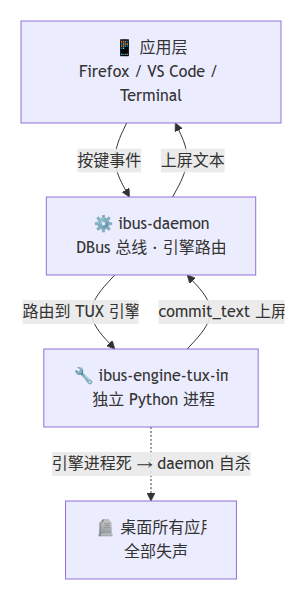
IBus architecture has two roles:
- ibus-daemon: the resident process, responsible for dispatching key events to the currently active input method engine.
- ibus-engine-xxx: the specific input method engine, receiving keypresses, generating candidates, and committing candidates to the focused application.
Sounds lightweight, right? Actually, IBus engine crash = the entire daemon dies — your typed characters get stuck in the keyboard buffer, all windows needing input methods go silent, and you must restart ibus-daemon to recover. This rule will appear repeatedly and is the most important constraint in the entire project.
Why IBus and Not fcitx5?
This was decided from the start. fcitx5 is popular in the Chinese community, but its C++ codebase and plugin mechanism were too heavy for me. I wanted a clean engine that let me write business logic in Python.
IBus provides official Python bindings (ibus-1.0) via GObject Introspection. This means:
- The engine main loop runs on GLib, business logic in Python, very little glue code.
- No need to manage threads, async, or event loops — GLib handles it.
- Good desktop compatibility (GNOME, KDE, Sway all work).
The cost: sparse IBus documentation, and a few API inconsistencies between the Python bindings and C (like IBus.Text.append not existing — a topic for another post). But these are surmountable.
The First Commit: Just Get It Running
The project started with aa4b094 Initial commit: TUX IM IBus engine. I pulled up this commit from git log — 132 lines of Python, 5 files:
- tux_im/init.py
- tux_im/main.py
- tux_im/main.py
- tux_im/engine.py
- tux_im/shortcut.py
Engine, shortcut parser, main entry point, module bootstrap — all in 132 lines. It could barely capture a keypress and echo it to the screen. But it was running. From there, the journey to a full-featured input method began.
Comments