
Ubuntu 26.10 Under the Hood: Linux Kernel 7.3, RISC-V RVA23, amd64v3, and Myna
Figure: AI-generated schematic of the Linux 7.3 kernel stack. Real diagram was unavailable at time of writing.
Ubuntu 26.10 is the most “interesting” interim release in years, and the headline — Myna, GNOME 51, Rust coreutils — gets the press. But the deeper story is in the systems that 26.10 is the first distribution to ship: Linux 7.3 with kernel-mode Rust for PowerPC, the first official RISC-V RVA23 desktop image, amd64v3 optimised install images, and the on-device AI substrate that Myna is built on.
For the high-level feature overview, see Ubuntu 26.10 Stonking Stingray Lands. For the upgrade path, see How to Upgrade to Ubuntu 26.10 Stonking Stingray (2026).
Linux 7.3 — what’s actually in the kernel
Ubuntu 26.10 ships linux-image-7.3.0-9.9-generic (and the arm64 / raspi / RISC-V variants). Because the final upstream 7.3 lands after GA, the in-tree kernel is based on the 7.3-rc6 tag. Ubuntu backports its own fixes on top, which is why the version string reads 7.3.0-9.9 instead of 7.3.0.
The interesting kernel changes that actually matter to Ubuntu users:
Processors and memory management
- Two big memory-management optimisations. Phoronix has been benchmarking these on Linux 7.3 and reports clear wins versus 7.2 and earlier, especially for Btrfs-heavy I/O.
- Initial Intel Starfire enablement. Starfire is the Panther Lake-derived SoC for extreme environments — think industrial / edge boxes. Not relevant for most users, but it shows where Intel is heading.
- Apple M3 Pro / Max / Ultra support, partial. CPU-side enablement is in; GPU support and other key day-to-day functionality still missing. The kernel knows how to bring the cores up but macOS remains the better experience for Apple silicon.
- Power optimisations for M1 Pro / Max / Ultra SoCs. Marginal but real battery-life gains for the rare Hackintosh or Asahi user running 26.10.
- Initial IBM Power12 enablement. PowerPC starts supporting in-kernel Rust code in 7.3.
- ARM64 BBML3 feature now mainline.
- Linux scheduler improvements for hybrid CPUs. Intel’s P-core / E-core and AMD’s CCD / cCD topologies see meaningful scheduling improvements.
- Scheduler work that helps gaming performance on dated hardware. A small but real win for old desktop boxes repurposed as gaming rigs.
- Qualcomm Shikra SoC support begins appearing — Qualcomm’s next datacenter-targeted chip.
- Several newer RISC-V extensions land in this kernel, feeding into Ubuntu’s RISC-V desktop push.
Graphics
- AMD DCN 6.0 display block support. The display engine in the next generation of AMD APUs (Strix Halo and beyond) is now understood by the kernel.
- Nouveau NVDEC interface support. This is what NVK (Mesa’s open-source NVIDIA driver) needs to support Vulkan Video acceleration in Mesa 26.3. Once Mesa 26.3 lands in 26.10’s update channel, NVK gets hardware-accelerated decode.
- FBDEV improvements for vintage Atari computers and 3dfx Voodoo 3/4/5. Real nostalgia territory.
Storage and file systems
- Btrfs performance improvements. The big file-system story for 7.3. Phoronix’s early benchmarks show meaningful throughput gains over 7.2 on Btrfs-heavy workloads.
- Continued code removal of obsolete / unmaintained drivers as a side effect of LLM-assisted kernel maintenance.
Other items of note
- The 7.3 kernel source is “just shy of 41 million lines.” Linus Torvalds noted in the 7.3-rc1 announcement that this kernel is on the heavier side, in part because of the increased patch churn from AI/LLM coding agents — both uncovering bugs and creating patches.
- The Rust-for-Linux work continues. PowerPC’s first in-kernel Rust code lands in 7.3.
What you should actually benchmark
If you are considering the kernel jump, the workloads that benefit most are:
- Btrfs-heavy servers and workstations (clear I/O throughput wins)
- Systems with hybrid CPU topologies (better scheduling = lower latency)
- Older gaming hardware (scheduler work for “dated computer hardware”)
- Anything that touches new AMD display IP (DCN 6.0)
- Apple M-series on Asahi (CPU + power)
If you are on a vanilla Intel / AMD x86_64 box from the last 5 years, the kernel jump from 7.0 to 7.3 is largely invisible. Run uname -r and move on.
RISC-V RVA23 — first Ubuntu desktop image
Figure: AI-generated illustration of a RISC-V RVA23 chip. Not an official Ubuntu graphic.
This is the headline infrastructure change for 26.10. Ubuntu has shipped RISC-V images for a long time, but they targeted RV64GC. 26.10 ships the first Ubuntu desktop image that targets RVA23 — the modern RISC-V profile that mandates hypervisor and vector extensions.
What changed:
- RVA23 is mandatory. Ubuntu 25.10 already moved to require RVA23; 26.10 is the first release where the desktop install image actually targets it.
- New RVA23 RISC-V platforms supported. SpacemiT K3 silicon (the first RVA23 chip) is the most prominent, but the kernel in 26.10 supports the broader RVA23 family.
- A kernel API to ask “is this machine RVA23?” Pending patches (Guodong Xu / Andrew Jones, September 2026) expose
RISCV_HWPROBE_BASE_BEHAVIOR_RVA23U64as a bitmask fromriscv_hwprobe(KEY_BASE_BEHAVIOR). This finally answers the “does my RISC-V box meet the profile?” question with one syscall, instead of every application having to check feature bits individually.
What this means in practice:
- If you are an embedded developer on RISC-V, 26.10 is the first Ubuntu release where you can install a desktop on an RVA23 board and have the full Ubuntu userland.
- If you are evaluating RISC-V as a server platform, RVA23 includes the hypervisor and vector extensions that data-center workloads need.
- If you are running x86 / ARM64, none of this applies — the RISC-V image is a separate download.
The longer arc is: Canonical is positioning itself to be the first major distribution with serious RISC-V desktop support, which matters because the RISC-V hardware ecosystem is still choosing which distros to invest in.
amd64v3 — the x86_64 install image you should be picking
Most Ubuntu desktop installs over the last decade picked the generic amd64 image. 26.10 ships a second image — amd64v3 — that uses AVX2 and the v3 baseline feature set.
What v3 means:
- Haswell-era Intel (2013+) and equivalent AMD CPUs support AVX2.
- The v3 ABI exposes AVX2 directly, allowing GCC and the standard libraries to use vectorised code paths.
- In practice this means 5-15% performance improvement on workloads that touch string handling, image processing, and any matrix multiplication (which is everything AI-adjacent).
Phoronix has early benchmarks showing AMD Strix Halo seeing particular gains on 26.10 with the amd64v3 image. The trade-off is that the image does not run on pre-Haswell CPUs — if you have a 2012 Sandy Bridge box, stick with the generic amd64 image.
How to know which one to pick at install time:
- Intel CPUs: anything from Haswell (4th-gen Core, 2013) onward supports amd64v3.
- AMD CPUs: anything from Carrizo (2015) and Excavator / Zen onward supports amd64v3.
- The installer will accept the amd64v3 image on a supported CPU and refuse it on an unsupported one.
If you are installing fresh, pick amd64v3 if your CPU supports it. The performance is free.
Myna — Ubuntu’s first on-device AI
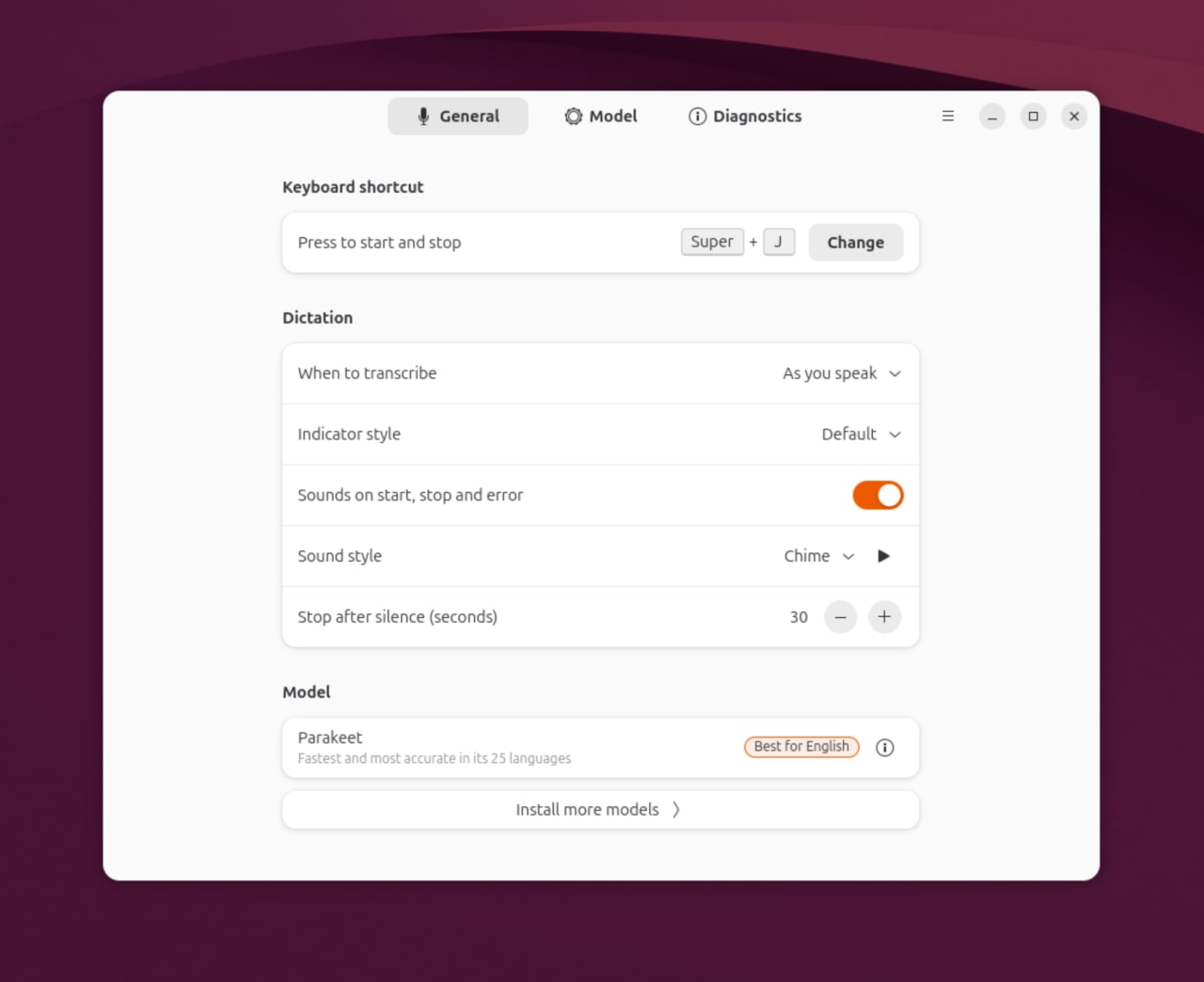
Figure: Canonical’s Myna settings panel showing the opt-in local speech-to-text configuration with Parakeet, Whisper, and FunASR engine options. Source — Canonical Ubuntu blog.
Myna is the user-visible end of Ubuntu’s on-device AI substrate. The architecture, as far as Canonical has documented:
- Local models. Once a model is downloaded, no internet connection is required for transcription. Audio never leaves the device.
- Multiple engine options. Parakeet (NVIDIA NeMo’s efficient ASR model), Whisper (OpenAI’s open model), and FunASR (an open-source Chinese-friendly engine). Each has different trade-offs in language support, accuracy, and hardware requirements.
- GPU acceleration on supported NVIDIA hardware. The engine selection shows an accelerated option when an NVIDIA GPU is present. Other accelerators are planned.
- Hotkey-driven dictation. Press the hotkey, talk, release — the audio becomes text in whatever field had the cursor. No application-level keyboard, no special API required.
- Cross-distribution availability. Myna runs on Ubuntu 24.04 LTS, 26.04 LTS, and 26.10. You can try it without upgrading to 26.10.
Why “on-device” matters
The architectural choice — speech recognition runs on your CPU/GPU, no cloud round-trip — has three consequences:
- Privacy. Audio never leaves the machine. There is no transcript server to compromise, no audio upload to subpoena. For anyone handling sensitive material, this is the only acceptable design.
- Latency. Local ASR is faster than cloud round-trips, especially on good hardware. The model starts transcribing in well under a second of speech.
- Cost to Canonical. No API calls to bill against, no inference fleet to operate, no per-token pricing. The user pays the inference cost in electricity and hardware.
The “model has been downloaded” caveat matters: the initial install pulls the ASR model from a Canonical server, but ongoing transcription is local. The models are roughly 100 MB to 1 GB depending on which engine and language you pick.
Myna is not a voice assistant — yet
Canonical has been explicit: Myna is dictation only. It does not navigate your desktop, does not answer questions, does not chain commands. The “context-aware desktop” that Canonical has been teasing — where you can express intent rather than navigate applications — is a multi-release roadmap. Myna is the first step. The on-device LLM substrate that Myna is built on (the same Parakeet / Whisper / FunASR model architecture) is also what future “intent layers” will use.
The longer-term roadmap puts context-aware desktop as the default in Ubuntu 28.04 LTS, two years from now. 26.10 is the public preview.
How to try Myna
# Add Canonical's Myna PPA and install the config UI
sudo add-apt-repository ppa:canonical-desktop-team/myna
sudo apt install myna-config

# Open Myna settings from Activities and follow the setup:
#   - Pick an engine (Parakeet, Whisper, FunASR)
#   - Pick a language model
#   - Pick a hotkey
# Then put your cursor in any text field, press the hotkey, and talk.
Useful test surface: dictating into a browser, into a terminal (yes, really — it works in GNOME Terminal), into a code editor, into a chat client. The transcription accuracy is engine- and language-dependent; Whisper is the strongest English baseline, Parakeet is faster, FunASR handles Chinese better.
Post-quantum package signing — supply-chain future-proofing
26.10 enables APT package signatures using post-quantum-ready algorithms. This is forward-looking work — the quantum threat to RSA-2048 / ECDSA is not here yet — but the cutover is non-trivial once quantum computers become capable, so making it in an interim release (rather than waiting for an LTS) lets Canonical shake out bugs on the willing.
What you actually see: nothing, day-to-day. APT still works the same. The signatures behind the scenes are different.
Verdict
The “headline” new features in 26.10 — Myna, GNOME 51, Rust coreutils — are the easy story to tell. The deeper story is that 26.10 is a systems release: Linux 7.3 with the first in-kernel Rust on PowerPC, the first RISC-V RVA23 desktop image, the first amd64v3 install image, the first on-device AI substrate. These are the changes that determine what Ubuntu looks like in 2028 and 2030, not just what it looks like in October 2026.
If you are running Ubuntu, the easiest way to feel these changes is to install 26.10 on a spare machine. The harder question — “should I move my fleet” — is one to answer with the comparison article.
For the broader feature overview, see Ubuntu 26.10 Stonking Stingray Lands. For the LTS-vs-interim decision, see Ubuntu 26.10 vs 26.04 LTS: Which One Should You Run in 2026?. For the upgrade path, see How to Upgrade to Ubuntu 26.10 Stonking Stingray (2026).
Sources: Phoronix — Linux 7.3 Features Many Exciting Improvements, Ubuntu release notes 26.10 — Linux kernel 7.3, Canonical RISC-V profiles blog, Canonical Myna tech preview blog.
Comments